My Model Save & Load
Easy, but Important!
Keras Update
!pip install keras-nightlyCollecting keras-nightly
Downloading keras_nightly-3.7.0.dev2025010203-py3-none-any.whl.metadata (5.8 kB)
Requirement already satisfied: absl-py in /usr/local/lib/python3.10/dist-packages (from keras-nightly) (1.4.0)
Requirement already satisfied: numpy in /usr/local/lib/python3.10/dist-packages (from keras-nightly) (1.26.4)
Requirement already satisfied: rich in /usr/local/lib/python3.10/dist-packages (from keras-nightly) (13.9.4)
Requirement already satisfied: namex in /usr/local/lib/python3.10/dist-packages (from keras-nightly) (0.0.8)
Requirement already satisfied: h5py in /usr/local/lib/python3.10/dist-packages (from keras-nightly) (3.12.1)
Requirement already satisfied: optree in /usr/local/lib/python3.10/dist-packages (from keras-nightly) (0.13.1)
Requirement already satisfied: ml-dtypes in /usr/local/lib/python3.10/dist-packages (from keras-nightly) (0.4.1)
Requirement already satisfied: packaging in /usr/local/lib/python3.10/dist-packages (from keras-nightly) (24.2)
Requirement already satisfied: typing-extensions>=4.5.0 in /usr/local/lib/python3.10/dist-packages (from optree->keras-nightly) (4.12.2)
Requirement already satisfied: markdown-it-py>=2.2.0 in /usr/local/lib/python3.10/dist-packages (from rich->keras-nightly) (3.0.0)
Requirement already satisfied: pygments<3.0.0,>=2.13.0 in /usr/local/lib/python3.10/dist-packages (from rich->keras-nightly) (2.18.0)
Requirement already satisfied: mdurl~=0.1 in /usr/local/lib/python3.10/dist-packages (from markdown-it-py>=2.2.0->rich->keras-nightly) (0.1.2)
Downloading keras_nightly-3.7.0.dev2025010203-py3-none-any.whl (1.3 MB)
━━━━━━━━━━━━━━━━━━━━━━━━━━━━━━━━━━━━━━━━ 1.3/1.3 MB 28.4 MB/s eta 0:00:00
Installing collected packages: keras-nightly
Successfully installed keras-nightly-3.7.0.dev2025010203Library Loading
import numpy as np
import pandas as pd
import matplotlib.pyplot as plt

from sklearn.model_selection import train_test_split
from sklearn.metrics import accuracy_score

import keras

from keras.backend import clear_session
from keras.models import Sequential, Model
from keras.layers import Input, Dense, BatchNormalization, Dropout, Flatten, Conv2D, MaxPool2D
from keras.layers import RandomRotation, RandomTranslation, RandomFlip, RandomZoom
from keras.callbacks import EarlyStopping
Data Loading
(train_x, train_y), (test_x, test_y) = keras.datasets.mnist.load_data()Downloading data from https://storage.googleapis.com/tensorflow/tf-keras-datasets/mnist.npz
11490434/11490434 ━━━━━━━━━━━━━━━━━━━━ 1s 0us/stepprint(train_x.shape, train_y.shape, test_x.shape, test_y.shape)(60000, 28, 28) (60000,) (10000, 28, 28) (10000,)id = np.random.randint(0, 10000)
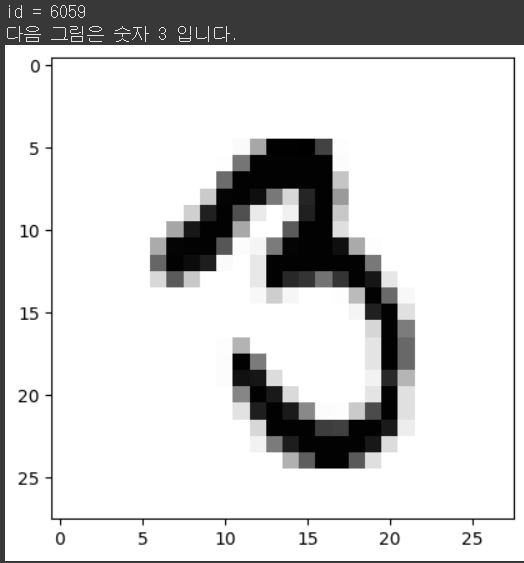
print(f'id = {id}')
print(f'다음 그림은 숫자 {test_y[id]} 입니다.')
plt.imshow(test_x[id], cmap='Greys')
plt.show()
Data Preprocessing
Data split
training set : validation set = 8 : 2
재현을 위한 난수 고정 : 2024
from sklearn.model_selection import train_test_splitfrom sklearn.model_selection import train_test_split
train_x, val_x, train_y, val_y =\
train_test_split(train_x, train_y, test_size=0.2, random_state=2024)train_x.shape, train_y.shape((48000, 28, 28), (48000,))train_x = train_x / 255.
val_x = val_x / 255.
test_x = test_x / 255.train_x.max(), train_x.min()(1.0, 0.0)from keras.utils import to_categoricaltrain_y = to_categorical(train_y, 10)
val_y = to_categorical(val_y, 10)
test_y = to_categorical(test_y, 10)train_x = train_x.reshape((-1, 28, 28, 1))
val_x = val_x.reshape((-1, 28, 28, 1))
test_x = test_x.reshape((-1, 28, 28, 1))train_x.shape, train_y.shape((48000, 28, 28, 1), (48000, 10))Modeling : CNN
조건
Sequential API, Functiona API 중 택일.
Image Augmentation Layer를 최소 하나 이상 넣을 것! : 공식 문서 참고
이 구조를 미니 버전으로 활용해봐도 좋다. DropOut, BatchNormalization 등의 기능도 같이 활용해보자.
Early Stopping을 사용할 것.
import keraskeras.utils.clear_session()
il = keras.layers.Input(shape=(28,28,1))
hl = keras.layers.RandomFlip("horizontal")(il)
hl = keras.layers.RandomTranslation(height_factor=0.1, width_factor=0.1)(hl)
hl = keras.layers.Conv2D(filters = 64, kernel_size=(3,3), strides = (1, 1), padding='same', activation='relu')(hl)
hl = keras.layers.Conv2D(64, 3, 1,'same', activation='relu',)(hl)
hl = keras.layers.MaxPool2D(2,2)(hl)
hl = keras.layers.BatchNormalization()(hl)
hl = keras.layers.Dropout(0.25)(hl)
hl = keras.layers.Conv2D(filters = 32, kernel_size=(3,3), strides = (1, 1), padding='same', activation='relu')(hl)
hl = keras.layers.Conv2D(32, 3, 1,'same', activation='relu',)(hl)
hl = keras.layers.MaxPool2D(2,2)(hl)
hl = keras.layers.BatchNormalization()(hl)
hl = keras.layers.Dropout(0.25)(hl)
hl = keras.layers.Flatten()(hl)
hl = keras.layers.Dense(256, activation='relu')(hl)
ol = keras.layers.Dense(10, activation='softmax')(hl)
model = keras.models.Model(il, ol)
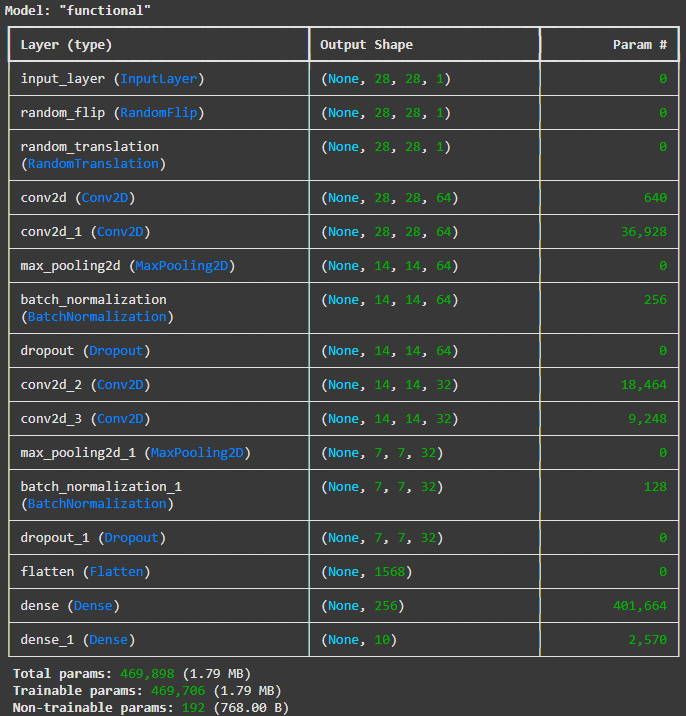
model.summary()
model.compile(optimizer='adam', loss='categorical_crossentropy', metrics=['accuracy'])from keras.callbacks import EarlyStopping
es = EarlyStopping(min_delta = 0, patience = 5, verbose = 1, restore_best_weights=True)from keras.callbacks import ModelCheckpointmcp = ModelCheckpoint(filepath='./model1.keras', # 모델 저장 경로
monitor='val_loss', # 모델 저장의 관심 대상
verbose=1, # 어느 시점에서 저장되는지 알려줌
save_best_only=True, # 최고 성능 모델만 저장
save_weights_only=False) # True : 가중치만 저장| False : 모델 구조 포함하여 저장history = model.fit(train_x, train_y, validation_data=(val_x, val_y),
epochs=10000, verbose=1,
callbacks=[es, mcp]
)Epoch 1/10000
1497/1500 ━━━━━━━━━━━━━━━━━━━━ 0s 12ms/step - accuracy: 0.8124 - loss: 0.5775
Epoch 1: val_loss improved from inf to 0.09654, saving model to ./model1.keras
1500/1500 ━━━━━━━━━━━━━━━━━━━━ 42s 13ms/step - accuracy: 0.8126 - loss: 0.5768 - val_accuracy: 0.9701 - val_loss: 0.0965
Epoch 2/10000
1497/1500 ━━━━━━━━━━━━━━━━━━━━ 0s 9ms/step - accuracy: 0.9564 - loss: 0.1371
Epoch 2: val_loss improved from 0.09654 to 0.06160, saving model to ./model1.keras
1500/1500 ━━━━━━━━━━━━━━━━━━━━ 25s 10ms/step - accuracy: 0.9564 - loss: 0.1370 - val_accuracy: 0.9802 - val_loss: 0.0616
Epoch 3/10000
1498/1500 ━━━━━━━━━━━━━━━━━━━━ 0s 9ms/step - accuracy: 0.9680 - loss: 0.1075
Epoch 3: val_loss did not improve from 0.06160
1500/1500 ━━━━━━━━━━━━━━━━━━━━ 21s 10ms/step - accuracy: 0.9680 - loss: 0.1075 - val_accuracy: 0.9678 - val_loss: 0.1170
Epoch 4/10000
1497/1500 ━━━━━━━━━━━━━━━━━━━━ 0s 9ms/step - accuracy: 0.9705 - loss: 0.0932
Epoch 4: val_loss did not improve from 0.06160
1500/1500 ━━━━━━━━━━━━━━━━━━━━ 15s 10ms/step - accuracy: 0.9705 - loss: 0.0932 - val_accuracy: 0.9768 - val_loss: 0.0745
Epoch 5/10000
1497/1500 ━━━━━━━━━━━━━━━━━━━━ 0s 11ms/step - accuracy: 0.9738 - loss: 0.0882
Epoch 5: val_loss improved from 0.06160 to 0.05179, saving model to ./model1.keras
1500/1500 ━━━━━━━━━━━━━━━━━━━━ 18s 12ms/step - accuracy: 0.9738 - loss: 0.0882 - val_accuracy: 0.9861 - val_loss: 0.0518
Epoch 6/10000
1500/1500 ━━━━━━━━━━━━━━━━━━━━ 0s 9ms/step - accuracy: 0.9770 - loss: 0.0749
Epoch 6: val_loss did not improve from 0.05179
1500/1500 ━━━━━━━━━━━━━━━━━━━━ 18s 10ms/step - accuracy: 0.9770 - loss: 0.0749 - val_accuracy: 0.9821 - val_loss: 0.0587
Epoch 7/10000
1497/1500 ━━━━━━━━━━━━━━━━━━━━ 0s 9ms/step - accuracy: 0.9778 - loss: 0.0726
Epoch 7: val_loss did not improve from 0.05179
1500/1500 ━━━━━━━━━━━━━━━━━━━━ 20s 10ms/step - accuracy: 0.9778 - loss: 0.0726 - val_accuracy: 0.9817 - val_loss: 0.0632
Epoch 8/10000
1500/1500 ━━━━━━━━━━━━━━━━━━━━ 0s 9ms/step - accuracy: 0.9797 - loss: 0.0648
Epoch 8: val_loss did not improve from 0.05179
1500/1500 ━━━━━━━━━━━━━━━━━━━━ 20s 10ms/step - accuracy: 0.9797 - loss: 0.0648 - val_accuracy: 0.9847 - val_loss: 0.0541
Epoch 9/10000
1494/1500 ━━━━━━━━━━━━━━━━━━━━ 0s 9ms/step - accuracy: 0.9802 - loss: 0.0624
Epoch 9: val_loss improved from 0.05179 to 0.05067, saving model to ./model1.keras
1500/1500 ━━━━━━━━━━━━━━━━━━━━ 15s 10ms/step - accuracy: 0.9802 - loss: 0.0624 - val_accuracy: 0.9850 - val_loss: 0.0507
Epoch 10/10000
1498/1500 ━━━━━━━━━━━━━━━━━━━━ 0s 9ms/step - accuracy: 0.9803 - loss: 0.0615
Epoch 10: val_loss did not improve from 0.05067
1500/1500 ━━━━━━━━━━━━━━━━━━━━ 21s 10ms/step - accuracy: 0.9803 - loss: 0.0615 - val_accuracy: 0.9848 - val_loss: 0.0521
Epoch 11/10000
1495/1500 ━━━━━━━━━━━━━━━━━━━━ 0s 9ms/step - accuracy: 0.9820 - loss: 0.0600
Epoch 11: val_loss did not improve from 0.05067
1500/1500 ━━━━━━━━━━━━━━━━━━━━ 15s 10ms/step - accuracy: 0.9820 - loss: 0.0599 - val_accuracy: 0.9817 - val_loss: 0.0625
Epoch 12/10000
1497/1500 ━━━━━━━━━━━━━━━━━━━━ 0s 9ms/step - accuracy: 0.9830 - loss: 0.0538
Epoch 12: val_loss improved from 0.05067 to 0.03749, saving model to ./model1.keras
1500/1500 ━━━━━━━━━━━━━━━━━━━━ 20s 10ms/step - accuracy: 0.9830 - loss: 0.0538 - val_accuracy: 0.9881 - val_loss: 0.0375
Epoch 13/10000
1500/1500 ━━━━━━━━━━━━━━━━━━━━ 0s 9ms/step - accuracy: 0.9829 - loss: 0.0558
Epoch 13: val_loss did not improve from 0.03749
1500/1500 ━━━━━━━━━━━━━━━━━━━━ 20s 10ms/step - accuracy: 0.9829 - loss: 0.0558 - val_accuracy: 0.9783 - val_loss: 0.0675
Epoch 14/10000
1498/1500 ━━━━━━━━━━━━━━━━━━━━ 0s 9ms/step - accuracy: 0.9845 - loss: 0.0490
Epoch 14: val_loss did not improve from 0.03749
1500/1500 ━━━━━━━━━━━━━━━━━━━━ 15s 10ms/step - accuracy: 0.9845 - loss: 0.0490 - val_accuracy: 0.9838 - val_loss: 0.0525
Epoch 15/10000
1494/1500 ━━━━━━━━━━━━━━━━━━━━ 0s 9ms/step - accuracy: 0.9848 - loss: 0.0472
Epoch 15: val_loss did not improve from 0.03749
1500/1500 ━━━━━━━━━━━━━━━━━━━━ 20s 10ms/step - accuracy: 0.9848 - loss: 0.0472 - val_accuracy: 0.9852 - val_loss: 0.0474
Epoch 16/10000
1497/1500 ━━━━━━━━━━━━━━━━━━━━ 0s 9ms/step - accuracy: 0.9856 - loss: 0.0461
Epoch 16: val_loss improved from 0.03749 to 0.03660, saving model to ./model1.keras
1500/1500 ━━━━━━━━━━━━━━━━━━━━ 15s 10ms/step - accuracy: 0.9856 - loss: 0.0461 - val_accuracy: 0.9890 - val_loss: 0.0366
Epoch 17/10000
1498/1500 ━━━━━━━━━━━━━━━━━━━━ 0s 9ms/step - accuracy: 0.9855 - loss: 0.0467
Epoch 17: val_loss did not improve from 0.03660
1500/1500 ━━━━━━━━━━━━━━━━━━━━ 21s 10ms/step - accuracy: 0.9855 - loss: 0.0467 - val_accuracy: 0.9868 - val_loss: 0.0423
Epoch 18/10000
1499/1500 ━━━━━━━━━━━━━━━━━━━━ 0s 9ms/step - accuracy: 0.9858 - loss: 0.0453
Epoch 18: val_loss improved from 0.03660 to 0.03471, saving model to ./model1.keras
1500/1500 ━━━━━━━━━━━━━━━━━━━━ 21s 10ms/step - accuracy: 0.9858 - loss: 0.0453 - val_accuracy: 0.9887 - val_loss: 0.0347
Epoch 19/10000
1495/1500 ━━━━━━━━━━━━━━━━━━━━ 0s 9ms/step - accuracy: 0.9855 - loss: 0.0434
Epoch 19: val_loss did not improve from 0.03471
1500/1500 ━━━━━━━━━━━━━━━━━━━━ 15s 10ms/step - accuracy: 0.9855 - loss: 0.0434 - val_accuracy: 0.9857 - val_loss: 0.0450
Epoch 20/10000
1499/1500 ━━━━━━━━━━━━━━━━━━━━ 0s 9ms/step - accuracy: 0.9862 - loss: 0.0415
Epoch 20: val_loss did not improve from 0.03471
1500/1500 ━━━━━━━━━━━━━━━━━━━━ 15s 10ms/step - accuracy: 0.9862 - loss: 0.0415 - val_accuracy: 0.9822 - val_loss: 0.0575
Epoch 21/10000
1496/1500 ━━━━━━━━━━━━━━━━━━━━ 0s 9ms/step - accuracy: 0.9869 - loss: 0.0394
Epoch 21: val_loss did not improve from 0.03471
1500/1500 ━━━━━━━━━━━━━━━━━━━━ 15s 10ms/step - accuracy: 0.9869 - loss: 0.0394 - val_accuracy: 0.9865 - val_loss: 0.0423
Epoch 22/10000
1498/1500 ━━━━━━━━━━━━━━━━━━━━ 0s 9ms/step - accuracy: 0.9878 - loss: 0.0380
Epoch 22: val_loss did not improve from 0.03471
1500/1500 ━━━━━━━━━━━━━━━━━━━━ 20s 10ms/step - accuracy: 0.9878 - loss: 0.0380 - val_accuracy: 0.9870 - val_loss: 0.0399
Epoch 23/10000
1496/1500 ━━━━━━━━━━━━━━━━━━━━ 0s 9ms/step - accuracy: 0.9889 - loss: 0.0355
Epoch 23: val_loss did not improve from 0.03471
1500/1500 ━━━━━━━━━━━━━━━━━━━━ 23s 11ms/step - accuracy: 0.9889 - loss: 0.0355 - val_accuracy: 0.9862 - val_loss: 0.0426
Epoch 23: early stopping
Restoring model weights from the end of the best epoch: 18.performance_test = model.evaluate(test_x, test_y)
print(f'Test Loss: {performance_test[0]:.6f}')
print(f'Test Accuracy: {performance_test[1]*100:.3f}%')313/313 ━━━━━━━━━━━━━━━━━━━━ 2s 5ms/step - accuracy: 0.9846 - loss: 0.0468
Test Loss: 0.033870
Test Accuracy: 98.950%if not isinstance(history, dict):
history = history.history
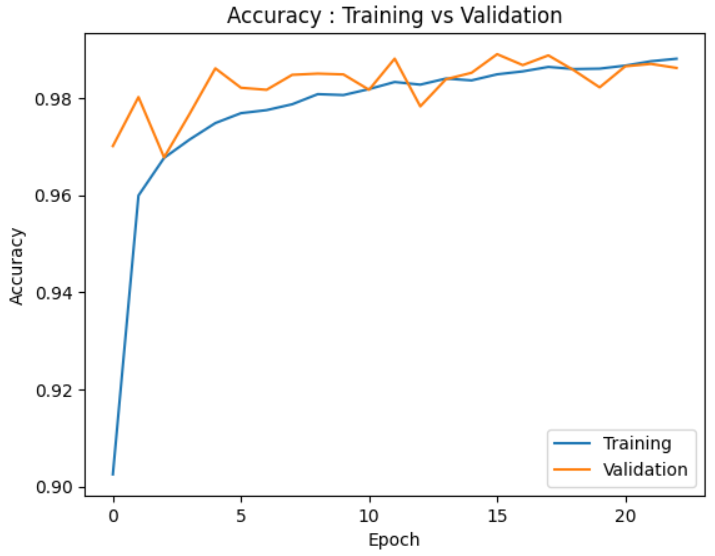
plt.plot(history['accuracy'])
plt.plot(history['val_accuracy'])
plt.title('Accuracy : Training vs Validation')
plt.ylabel('Accuracy')
plt.xlabel('Epoch')
plt.legend(['Training', 'Validation'], loc=0)
plt.show()
if not isinstance(history, dict):
    history = history.history

plt.plot(history['loss'])
plt.plot(history['val_loss'])
plt.title('Loss : Training vs Validation')
plt.ylabel('Loss')
plt.xlabel('Epoch')
plt.legend(['Training', 'Validation'], loc=0)
plt.show()
Model Save & Load
모델을 새롭게 저장하여 구조와 가중치 일부를 살펴보자
model.save('./my_first_save.keras')keras.utils.clear_session()
model3 = keras.saving.load_model('./my_first_save.keras')
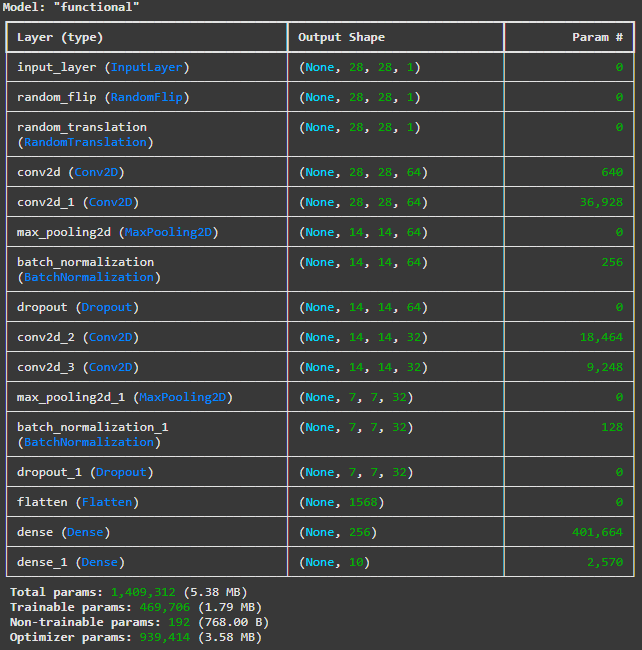
model3.summary()
model3.get_weights()[0][0][0]array([[-0.01334978, 0.19768286, -0.15613791, 0.18311208, -0.10298585,
-0.20779139, -0.17825127, -0.30410308, -0.12901919, 0.17121775,
0.1544095 , -0.14950821, 0.15667453, -0.08900613, 0.11676026,
-0.0771829 , 0.14743373, -0.04675323, 0.0797715 , -0.04239114,
0.04504853, -0.34723446, -0.07476768, -0.17491005, -0.1221816 ,
-0.20365416, -0.28429794, -0.06921752, -0.29682454, -0.12865856,
-0.02740635, -0.0387251 , 0.12866853, -0.24827999, 0.24934225,
0.08017209, 0.01281166, -0.22749482, 0.0643184 , -0.22490464,
0.01765089, -0.03361805, 0.10694103, -0.45659456, -0.21295159,
-0.17004003, -0.01000399, -0.1992273 , 0.01507062, -0.02072169,
-0.15548185, 0.21006358, -0.02800037, -0.09309239, 0.22013374,
0.12148987, 0.29152286, -0.00325214, -0.14894727, 0.09460433,
0.34439915, 0.12345196, -0.32282397, 0.18128632]],
dtype=float32)
학습 과정에서 저장된 모델을 불러와 구조와 가중치 일부를 살펴보자
keras.utils.clear_session()

model = keras.saving.load_model('./model1.keras')
model.summary()
model.get_weights()[0][0][0]array([[-0.01334978, 0.19768286, -0.15613791, 0.18311208, -0.10298585,
-0.20779139, -0.17825127, -0.30410308, -0.12901919, 0.17121775,
0.1544095 , -0.14950821, 0.15667453, -0.08900613, 0.11676026,
-0.0771829 , 0.14743373, -0.04675323, 0.0797715 , -0.04239114,
0.04504853, -0.34723446, -0.07476768, -0.17491005, -0.1221816 ,
-0.20365416, -0.28429794, -0.06921752, -0.29682454, -0.12865856,
-0.02740635, -0.0387251 , 0.12866853, -0.24827999, 0.24934225,
0.08017209, 0.01281166, -0.22749482, 0.0643184 , -0.22490464,
0.01765089, -0.03361805, 0.10694103, -0.45659456, -0.21295159,
-0.17004003, -0.01000399, -0.1992273 , 0.01507062, -0.02072169,
-0.15548185, 0.21006358, -0.02800037, -0.09309239, 0.22013374,
0.12148987, 0.29152286, -0.00325214, -0.14894727, 0.09460433,
0.34439915, 0.12345196, -0.32282397, 0.18128632]],
dtype=float32)pred_train = model.predict(train_x)
pred_test = model.predict(test_x)
single_pred_train = pred_train.argmax(axis=1)
single_pred_test = pred_test.argmax(axis=1)
logi_train_accuracy = accuracy_score(train_y.argmax(axis=1), single_pred_train)
logi_test_accuracy = accuracy_score(test_y.argmax(axis=1), single_pred_test)
print('CNN')
print(f'트레이닝 정확도 : {logi_train_accuracy*100:.2f}%')
print(f'테스트 정확도 : {logi_test_accuracy*100:.2f}%')1500/1500 ━━━━━━━━━━━━━━━━━━━━ 4s 3ms/step
313/313 ━━━━━━━━━━━━━━━━━━━━ 1s 3ms/step
CNN
트레이닝 정확도 : 99.24%
테스트 정확도 : 98.95%Visualization
'''
성능 확인을 위해
Ctrl+Enter를 이용하여
반복 실행 해보자!
'''

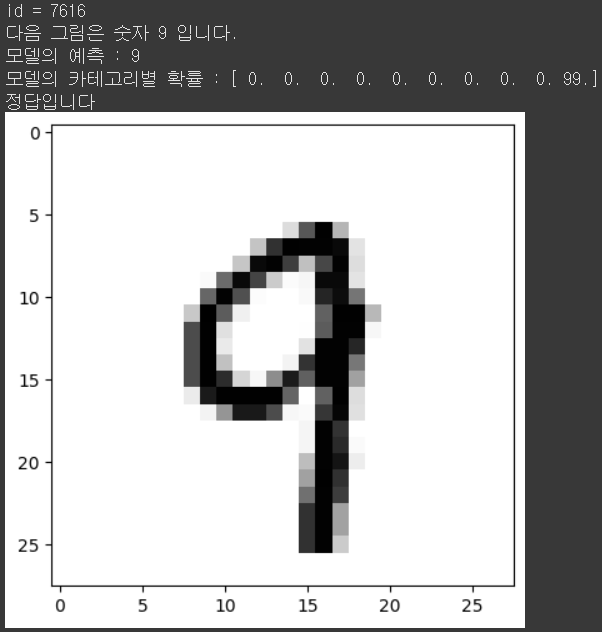
id = np.random.randint(0,10000)

print(f'id = {id}')
print(f'다음 그림은 숫자 {test_y.argmax(axis=1)[id]} 입니다.')
print(f'모델의 예측 : {single_pred_test[id]}')
print(f'모델의 카테고리별 확률 : {np.floor(pred_test[id]*100)}')

if test_y.argmax(axis=1)[id] == single_pred_test[id] :
    print('정답입니다')
else :
    print('틀렸어요')

plt.imshow(test_x[id].reshape([28,-1]), cmap='Greys')
plt.show()
true_false = (test_y.argmax(axis=1) == single_pred_test)
f_id = np.where(true_false == False)[0]
f_n = len(f_id)

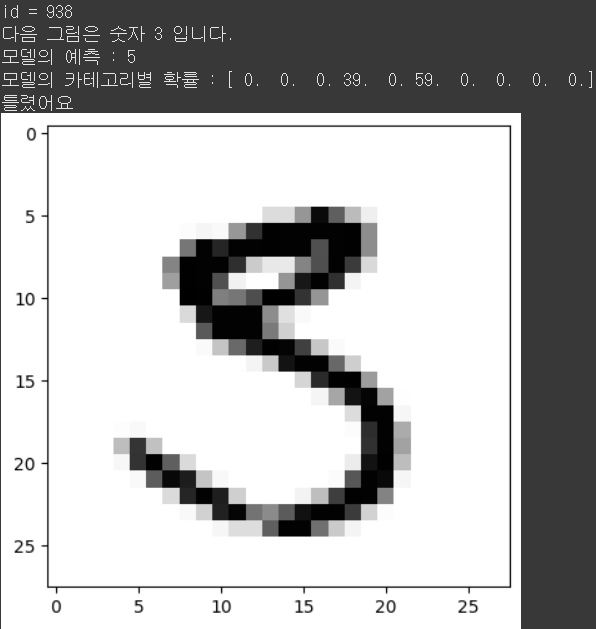
id = f_id[np.random.randint(0,f_n)]

print(f'id = {id}')
print(f'다음 그림은 숫자 {test_y.argmax(axis=1)[id]} 입니다.')
print(f'모델의 예측 : {single_pred_test[id]}')
print(f'모델의 카테고리별 확률 : {np.floor(pred_test[id]*100)}')

if test_y.argmax(axis=1)[id] == single_pred_test[id] :
    print('정답입니다')
else :
    print('틀렸어요')

plt.imshow(test_x[id].reshape([28,-1]), cmap='Greys')
plt.show()
내가 만든 손글씨 이미지는 어떻게 판단할까? 구글 드라이브에 손글씨 이미지를 업로드! 순서
그림판으로 숫자를 그려서 저장한다.
구글 드라이브 첫 화면에 my_data 라는 폴더를 만든다.
my_data 폴더 안에 my_mnist 폴더를 만든다.
my_mnist 폴더 안에 1번 과정에서 만든 이미지를 업로드한다.
30초 정도 기다립시다.
아래의 코드들을 실행해본다.
Connect Colaboratory with my Google Drive
Colaboratory와 본인의 구글 드라이브를 연결하는 과정
아래 코드를 실행하여 폴더가 올바르게 생성 되었는지 확인
from google.colab import drive
drive.mount('/content/drive')
Mounted at /content/drive!lsdrive model1.keras my_first_save.keras sample_data!cd /content/drive/MyDrive/my_data; lsimg1 img2 my_mnist my_mnist2 transfer transfer2Load Image
import glob
from keras.preprocessing import image
files = glob.glob('/content/drive/MyDrive/my\_data/my\_mnist/\*')
files['/content/drive/MyDrive/my_data/my_mnist/3_0808.png',
'/content/drive/MyDrive/my_data/my_mnist/2_3_1024.png',
'/content/drive/MyDrive/my_data/my_mnist/2_2.png',
'/content/drive/MyDrive/my_data/my_mnist/2_2024.png',
'/content/drive/MyDrive/my_data/my_mnist/2_2_1024.png',
'/content/drive/MyDrive/my_data/my_mnist/2_1_1024.png',
'/content/drive/MyDrive/my_data/my_mnist/2_1.png',
'/content/drive/MyDrive/my_data/my_mnist/2_0808.png',
'/content/drive/MyDrive/my_data/my_mnist/2_0403.png',
'/content/drive/MyDrive/my_data/my_mnist/1_2024.png',
'/content/drive/MyDrive/my_data/my_mnist/1_3_1024.png',
'/content/drive/MyDrive/my_data/my_mnist/1_2_1024.png',
'/content/drive/MyDrive/my_data/my_mnist/1_1.png',
'/content/drive/MyDrive/my_data/my_mnist/1_2.png',
'/content/drive/MyDrive/my_data/my_mnist/1_1_1024.png',
'/content/drive/MyDrive/my_data/my_mnist/1_0403.png',
'/content/drive/MyDrive/my_data/my_mnist/1_0808.png',
'/content/drive/MyDrive/my_data/my_mnist/0_2_1024.png',
'/content/drive/MyDrive/my_data/my_mnist/0_3_1024.png',
'/content/drive/MyDrive/my_data/my_mnist/0_1_1024.png',
'/content/drive/MyDrive/my_data/my_mnist/0_2024.png',
'/content/drive/MyDrive/my_data/my_mnist/0_1.png',
'/content/drive/MyDrive/my_data/my_mnist/0_2.png',
'/content/drive/MyDrive/my_data/my_mnist/0_0808.png',
'/content/drive/MyDrive/my_data/my_mnist/0_0403.png',
'/content/drive/MyDrive/my_data/my_mnist/6_1_1024.png',
'/content/drive/MyDrive/my_data/my_mnist/6_0808.png',
'/content/drive/MyDrive/my_data/my_mnist/6_0403.png',
'/content/drive/MyDrive/my_data/my_mnist/5_2_1024.png',
'/content/drive/MyDrive/my_data/my_mnist/5_1_1024.png',
'/content/drive/MyDrive/my_data/my_mnist/5_2024.png',
'/content/drive/MyDrive/my_data/my_mnist/5_1.png',
'/content/drive/MyDrive/my_data/my_mnist/5_2.png',
'/content/drive/MyDrive/my_data/my_mnist/5_3_1024.png',
'/content/drive/MyDrive/my_data/my_mnist/5_0808.png',
'/content/drive/MyDrive/my_data/my_mnist/3_2024.png',
'/content/drive/MyDrive/my_data/my_mnist/5_0403.png',
'/content/drive/MyDrive/my_data/my_mnist/3_0403.png',
'/content/drive/MyDrive/my_data/my_mnist/3_2.png',
'/content/drive/MyDrive/my_data/my_mnist/3_1.png',
'/content/drive/MyDrive/my_data/my_mnist/3_1_1024.png',
'/content/drive/MyDrive/my_data/my_mnist/4_2024.png',
'/content/drive/MyDrive/my_data/my_mnist/4_1_1024.png',
'/content/drive/MyDrive/my_data/my_mnist/4_1.png',
'/content/drive/MyDrive/my_data/my_mnist/3_3_1024.png',
'/content/drive/MyDrive/my_data/my_mnist/4_0403.png',
'/content/drive/MyDrive/my_data/my_mnist/4_2.png',
'/content/drive/MyDrive/my_data/my_mnist/4_0808.png',
'/content/drive/MyDrive/my_data/my_mnist/4_2_1024.png',
'/content/drive/MyDrive/my_data/my_mnist/3_2_1024.png',
'/content/drive/MyDrive/my_data/my_mnist/4_3_1024.png',
'/content/drive/MyDrive/my_data/my_mnist/9_3_1024.png',
'/content/drive/MyDrive/my_data/my_mnist/9_2_1024.png',
'/content/drive/MyDrive/my_data/my_mnist/7_1.png',
'/content/drive/MyDrive/my_data/my_mnist/6_3_1024.png',
'/content/drive/MyDrive/my_data/my_mnist/7_0808.png',
'/content/drive/MyDrive/my_data/my_mnist/6_2.png',
'/content/drive/MyDrive/my_data/my_mnist/9_1.png',
'/content/drive/MyDrive/my_data/my_mnist/9_2.png',
'/content/drive/MyDrive/my_data/my_mnist/9_0808.png',
'/content/drive/MyDrive/my_data/my_mnist/9_0403.png',
'/content/drive/MyDrive/my_data/my_mnist/9_1_1024.png',
'/content/drive/MyDrive/my_data/my_mnist/9_2024.png',
'/content/drive/MyDrive/my_data/my_mnist/8_3_1024.png',
'/content/drive/MyDrive/my_data/my_mnist/8_2_1024.png',
'/content/drive/MyDrive/my_data/my_mnist/7_2_1024.png',
'/content/drive/MyDrive/my_data/my_mnist/7_0403.png',
'/content/drive/MyDrive/my_data/my_mnist/6_2_1024.png',
'/content/drive/MyDrive/my_data/my_mnist/6_2024.png',
'/content/drive/MyDrive/my_data/my_mnist/6_1.png',
'/content/drive/MyDrive/my_data/my_mnist/7_2.png',
'/content/drive/MyDrive/my_data/my_mnist/7_2024.png',
'/content/drive/MyDrive/my_data/my_mnist/8_0808.png',
'/content/drive/MyDrive/my_data/my_mnist/7_3_1024.png',
'/content/drive/MyDrive/my_data/my_mnist/8_1_1024.png',
'/content/drive/MyDrive/my_data/my_mnist/8_1.png',
'/content/drive/MyDrive/my_data/my_mnist/7_1_1024.png',
'/content/drive/MyDrive/my_data/my_mnist/8_0403.png',
'/content/drive/MyDrive/my_data/my_mnist/8_2.png',
'/content/drive/MyDrive/my_data/my_mnist/8_2024.png']img = image.load_img(files[0], color_mode='grayscale', target_size=(28,28) )
img = image.img_to_array(img)
plt.imshow(img.reshape(img.shape[0], img.shape[1]), cmap='gray')
plt.show()
img = 255-imgplt.imshow(img.reshape(img.shape[0],img.shape[1]), cmap='Greys' )
plt.show()
model.predict(img.reshape((-1,28,28,1)))[0].argmax()1/1 ━━━━━━━━━━━━━━━━━━━━ 0s 156ms/step8Load Images
images = []

for path in files :
    img = image.load_img(path, color_mode='grayscale', target_size=(28,28) )
    img = image.img_to_array(img)
    img = 255-img
    images.append(img)

images = np.array(images)images.shape(80, 28, 28, 1)pred = model.predict(images)
for i in range(images.shape\[0\]) :
print('====================================')
print(f'모델의 예측 : {pred\[i\].argmax()}')
print(f'모델의 카테고리별 확률 : {np.floor(pred\[i\]\*100)}')
plt.imshow(images\[i\].reshape(28,28) , cmap='Greys')
plt.show()/ 사진의 양이 너무 많아 출력값은 생략하도록 한다.Extra: image_dataset_from_directory
이미 내가 이미지 데이터를 클래스별로 정리한 상태라면?
순서
구글 드라이브에 my_data/my_mnist2 폴더를 생성합니다.
my_mnist2 폴더 안에 손글씨가 폴더별로 구분되어야 한다.
ex) 0에 대한 이미지면 my_data/my_mnist2/0/0_1.jpg
ex) 1에 대한 이미지면 my_data/my_mnist2/1/1_1.jpg
from keras.utils import image_dataset_from_directoryimport os
import glob
import shutil
# Google Drive 경로 설정
cwd_path = '/content/drive/MyDrive/my_data/my_mnist/'
# my_mnist 디렉토리 내의 모든 파일 가져오기
files = glob.glob(cwd_path + '*')
for file in files:
# 파일 이름에서 첫 번째 문자 추출 (라벨)
label = os.path.basename(file)[0]
# my_mnist2 디렉토리 내의 라벨 폴더 경로 설정
folder_path = os.path.join('/content/drive/MyDrive/my_data/my_mnist2', label)
# 라벨 폴더가 없으면 생성
if not os.path.exists(folder_path):
os.makedirs(folder_path)
# 파일 이동 & 카피
#shutil.move(file, os.path.join(folder_path, os.path.basename(file)))
shutil.copy(file, os.path.join(folder_path, os.path.basename(file)))
print("Files moved successfully.")Files moved successfully.# import os
# import glob
# import shutil
# cwd_path = os.getcwd() + '/'
# files = glob.glob(cwd_path + 'my_mnist' + '/*')
# for file in files:
# label = os.path.basename(file)[0]
# folder_path = os.path.join(cwd_path + 'my_mnist2', label)
# if not os.path.exists(folder_path):
# os.makedirs(folder_path)
# shutil.move(file, os.path.join(folder_path, os.path.basename(file)))# idfd_train, idfd_valid = image_dataset_from_directory('/content/drive/MyDrive/my_data/my_mnist2',
# label_mode='categorical',
# color_mode='grayscale',
# image_size=(28,28),
# seed=2024,
# validation_split=0.2,
# subset='both'
# )
idfd_train = image_dataset_from_directory('/content/drive/MyDrive/my_data/my_mnist2',
label_mode='categorical',
color_mode='grayscale',
image_size=(28,28),
)Found 80 files belonging to 10 classes.keras.utils.clear_session()
model5 = keras.models.load_model('./model1.keras')
#model5.summary()model5.fit(idfd_train,
# validation_data=idfd_valid,
epochs=1, verbose=1)3/3 ━━━━━━━━━━━━━━━━━━━━ 3s 223ms/step - accuracy: 0.3992 - loss: 5.2380<keras.src.callbacks.history.History at 0x787b3d5f63b0>images = []
for path in files :
img = image.load_img(path, color_mode='grayscale', target_size=(28,28) )
img = image.img_to_array(img)
img = 255-img
images.append(img)
images = np.array(images)images.shape(80, 28, 28, 1)pred = model5.predict(images)
for i in range(images.shape\[0\]) :
print('====================================')
print(f'모델의 예측 : {pred\[i\].argmax()}')
print(f'모델의 카테고리별 확률 : {np.floor(pred\[i\]\*100)}')
plt.imshow(images\[i\].reshape(28,28) , cmap='Greys')
plt.show()/사진의 양이 너무 많아 출력값은 생략 합니다.