Image Data Augmentation Exercise : CIFAR-100
데이터가 더 부족한 세상으로!
여기 참고 - https://www.cs.toronto.edu/~kriz/cifar.html
Keras Update
!pip install keras-nightlyCollecting keras-nightly
Downloading keras_nightly-3.7.0.dev2025010203-py3-none-any.whl.metadata (5.8 kB)
Requirement already satisfied: absl-py in /usr/local/lib/python3.10/dist-packages (from keras-nightly) (1.4.0)
Requirement already satisfied: numpy in /usr/local/lib/python3.10/dist-packages (from keras-nightly) (1.26.4)
Requirement already satisfied: rich in /usr/local/lib/python3.10/dist-packages (from keras-nightly) (13.9.4)
Requirement already satisfied: namex in /usr/local/lib/python3.10/dist-packages (from keras-nightly) (0.0.8)
Requirement already satisfied: h5py in /usr/local/lib/python3.10/dist-packages (from keras-nightly) (3.12.1)
Requirement already satisfied: optree in /usr/local/lib/python3.10/dist-packages (from keras-nightly) (0.13.1)
Requirement already satisfied: ml-dtypes in /usr/local/lib/python3.10/dist-packages (from keras-nightly) (0.4.1)
Requirement already satisfied: packaging in /usr/local/lib/python3.10/dist-packages (from keras-nightly) (24.2)
Requirement already satisfied: typing-extensions>=4.5.0 in /usr/local/lib/python3.10/dist-packages (from optree->keras-nightly) (4.12.2)
Requirement already satisfied: markdown-it-py>=2.2.0 in /usr/local/lib/python3.10/dist-packages (from rich->keras-nightly) (3.0.0)
Requirement already satisfied: pygments<3.0.0,>=2.13.0 in /usr/local/lib/python3.10/dist-packages (from rich->keras-nightly) (2.18.0)
Requirement already satisfied: mdurl~=0.1 in /usr/local/lib/python3.10/dist-packages (from markdown-it-py>=2.2.0->rich->keras-nightly) (0.1.2)
Downloading keras_nightly-3.7.0.dev2025010203-py3-none-any.whl (1.3 MB)
━━━━━━━━━━━━━━━━━━━━━━━━━━━━━━━━━━━━━━━━ 1.3/1.3 MB 17.4 MB/s eta 0:00:00
Installing collected packages: keras-nightly
Successfully installed keras-nightly-3.7.0.dev2025010203Data Loading
import numpy as np
import matplotlib.pyplot as plt

from keras.datasets.cifar100 import load_data
(train_x, train_y), (test_x, test_y) = load_data()
# (train_x, train_y), (test_x, test_y) = load_data(label_mode='coarse')np.unique(train_y)array([ 0, 1, 2, 3, 4, 5, 6, 7, 8, 9, 10, 11, 12, 13, 14, 15, 16,
17, 18, 19, 20, 21, 22, 23, 24, 25, 26, 27, 28, 29, 30, 31, 32, 33,
34, 35, 36, 37, 38, 39, 40, 41, 42, 43, 44, 45, 46, 47, 48, 49, 50,
51, 52, 53, 54, 55, 56, 57, 58, 59, 60, 61, 62, 63, 64, 65, 66, 67,
68, 69, 70, 71, 72, 73, 74, 75, 76, 77, 78, 79, 80, 81, 82, 83, 84,
85, 86, 87, 88, 89, 90, 91, 92, 93, 94, 95, 96, 97, 98, 99])label_dict = {0:'apple', 1: 'aquarium_fish', 2: 'baby', 3: 'bear', 4: 'beaver', 5: 'bed', 6: 'bee', 7: 'beetle', 8: 'bicycle', 9: 'bottle',
10: 'bowl', 11: 'boy',12: 'bridge',13: 'bus',14: 'butterfly',15: 'camel',16: 'can',17: 'castle',18: 'caterpillar',19: 'cattle',
20: 'chair',21: 'chimpanzee',22: 'clock',23: 'cloud',24: 'cockroach',25: 'couch',26: 'cra',27: 'crocodile',28: 'cup',29: 'dinosaur',
30: 'dolphin',31: 'elephant',32: 'flatfish',33: 'forest',34: 'fox',35: 'girl',36: 'hamster',37: 'house',38: 'kangaroo',39: 'keyboard',
40: 'lamp',41: 'lawn_mower',42: 'leopard',43: 'lion',44: 'lizard',45: 'lobster',46: 'man',47: 'maple_tree',48: 'motorcycle',49: 'mountain',
50: 'mouse',51: 'mushroom',52: 'oak_tree',53: 'orange',54: 'orchid',55: 'otter',56: 'palm_tree',57: 'pear',58: 'pickup_truck',59: 'pine_tree',
60: 'plain',61: 'plate',62: 'poppy',63: 'porcupine',64: 'possum',65: 'rabbit',66: 'raccoon',67: 'ray',68: 'road',69: 'rocket',
70: 'rose',71: 'sea',72: 'seal',73: 'shark',74: 'shrew',75: 'skunk',76: 'skyscraper',77: 'snail',78: 'snake',79: 'spider',
80: 'squirrel',81: 'streetcar',82: 'sunflower',83: 'sweet_pepper',84: 'table',85: 'tank',86: 'telephone',87: 'television',88: 'tiger',89: 'tractor',
90: 'train',91: 'trout',92: 'tulip',93: 'turtle',94: 'wardrobe',95: 'whale',96: 'willow_tree',97: 'wolf',98: 'woman',99: 'worm'
}
label_dict[0]apple- 데이터 살펴보기
rand_i = np.random.randint(0, train_x.shape[0])

plt.title(f'idx: {rand_i} , class: { label_dict[train_y[rand_i][0]] }')
plt.imshow( train_x[rand_i] )
plt.show()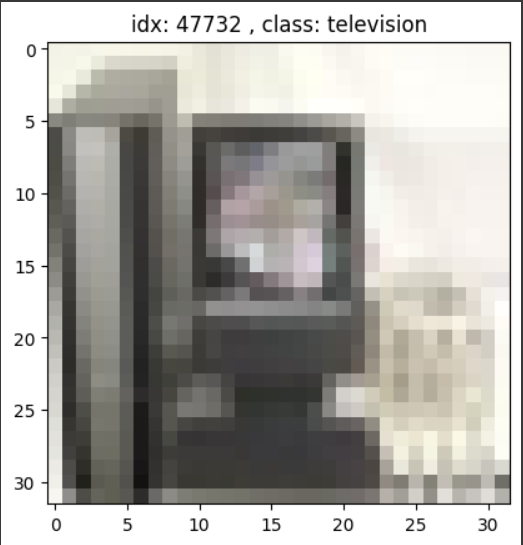
rows = 5
fig, axes = plt.subplots(rows, len(label_dict), figsize=(len(label_dict), rows) )

for img_id in range(len(label_dict)) :
    imgs = train_x[train_y.reshape(-1)==img_id]
    imgs_len = len(imgs)

    for row_i in range(rows) :
        axe = axes[row_i, img_id]
        axe.imshow( imgs[np.random.randint(imgs_len)], interpolation='none' )
        axe.axis('off')

plt.tight_layout()
plt.show()
Data Preprocessing
- Data split
- training set : validation set = 8 : 2
- 재현을 위한 난수 고정 : 2024
from sklearn.model_selection import train_test_split as ttstrain_x, val_x, train_y, val_y = tts(train_x, train_y, test_size=0.2, random_state=2024)train_x.shape, train_y.shape((40000, 32, 32, 3), (40000, 1))- Scaling
- min-max scaling (선택사항)
- RGB 정보 전체를 min-max
- R 따로 G 따로 B 따로 min-max, 그 후 하나로 통합
- min-max scaling (선택사항)
# min-max scaling 1번 방법
max_n, min_n = train_x.max(), train_x.min()
max_n, min_n
(255, 0)train_x_mm1 = (train_x - min_n) / (max_n - min_n)
val_x_mm1 = (val_x - min_n) / (max_n - min_n)
test_x_mm1 = (test_x - min_n) / (max_n - min_n)train_x_mm1.max(), train_x_mm1.min()(1.0, 0.0)# min-max scaling 2번 방법
tr_r_max, tr_r_min = train_x[:,:,:,0].max(), train_x[:,:,:,0].min()
tr_g_max, tr_g_min = train_x[:,:,:,1].max(), train_x[:,:,:,1].min()
tr_b_max, tr_b_min = train_x[:,:,:,2].max(), train_x[:,:,:,2].min()train_r_mm = (train_x[:,:,:,0] - tr_r_min) / (tr_r_max - tr_r_min)
train_g_mm = (train_x[:,:,:,1] - tr_g_min) / (tr_g_max - tr_g_min)
train_b_mm = (train_x[:,:,:,2] - tr_b_min) / (tr_b_max - tr_b_min)train_x_mm = np.stack((train_r_mm, train_g_mm, train_b_mm), axis=3)train_x_mm.shape(40000, 32, 32, 3)val_r_mm = (val_x[:,:,:,0] - tr_r_min) / (tr_r_max - tr_r_min)
val_g_mm = (val_x[:,:,:,1] - tr_g_min) / (tr_g_max - tr_g_min)
val_b_mm = (val_x[:,:,:,2] - tr_b_min) / (tr_b_max - tr_b_min)val_x_mm = np.stack((val_r_mm, val_g_mm, val_b_mm), axis=3)val_x_mm.shape(10000, 32, 32, 3)test_r_mm = (test_x[:,:,:,0] - tr_r_min) / (tr_r_max - tr_r_min)
test_g_mm = (test_x[:,:,:,1] - tr_g_min) / (tr_g_max - tr_g_min)
test_b_mm = (test_x[:,:,:,2] - tr_b_min) / (tr_b_max - tr_b_min)test_x_mm = np.stack((test_r_mm, test_g_mm, test_b_mm), axis=3)test_x_mm.shape(10000, 32, 32, 3)- One-hot encoding
train_y.shape
train_y
array([[ 2],
[58],
[74],
...,
[15],
[78],
[35]])class_n = len(np.unique(train_y))from keras.utils import to_categoricaltrain_y = to_categorical(train_y, class_n)
val_y = to_categorical(val_y, class_n)
test_y = to_categorical(test_y, class_n)- Data shape 재확인
train_x_mm.shape, train_y.shape((40000, 32, 32, 3), (40000, 100))train_y[0]array([0., 0., 1., 0., 0., 0., 0., 0., 0., 0., 0., 0., 0., 0., 0., 0., 0.,
0., 0., 0., 0., 0., 0., 0., 0., 0., 0., 0., 0., 0., 0., 0., 0., 0.,
0., 0., 0., 0., 0., 0., 0., 0., 0., 0., 0., 0., 0., 0., 0., 0., 0.,
0., 0., 0., 0., 0., 0., 0., 0., 0., 0., 0., 0., 0., 0., 0., 0., 0.,
0., 0., 0., 0., 0., 0., 0., 0., 0., 0., 0., 0., 0., 0., 0., 0., 0.,
0., 0., 0., 0., 0., 0., 0., 0., 0., 0., 0., 0., 0., 0., 0.])Modeling : CNN
- 조건
- Sequential API, Functiona API 중 택일.
- Image Augmentation Layer를 최소 하나 이상 넣을 것! : 공식 문서 참고
- 이 구조를 미니 버전으로 활용해봐도 좋다.
- DropOut, BatchNormalization 등의 기능도 같이 활용해보자.
- Early Stopping을 사용할 것.
import keras

from keras.backend import clear_session
from keras.models import Model
from keras.layers import Input, Dense, Flatten, BatchNormalization, Dropout, Conv2D, MaxPool2D
from keras.layers import RandomRotation, RandomTranslation, RandomZoom, RandomFlip
# Functional API
# 1. 세션 클리어
clear_session()
# 2. 레이어 엮기
il = Input(shape=(32,32,3) )
al = RandomRotation(0.2)(il)
al = RandomTranslation(0.2, 0.2)(al)
al = RandomZoom(0.1)(al)
al = RandomFlip()(al)
hl = Conv2D(filters=64, # 새롭게 제작하려는 feature map의 수! 서로 다른 filter의 수
kernel_size=(3,3), # Conv filter의 가로세로 사이즈
strides=(1,1), # Conv filter의 이동 보폭
padding='same', # 1. 이전 feature map 사이즈 유지 | 2. 외곽 정보 더 반영
activation='relu' # 명시 주의!
)(al)
hl = Conv2D(filters=64, # 새롭게 제작하려는 feature map의 수! 서로 다른 filter의 수
kernel_size=(3,3), # Conv filter의 가로세로 사이즈
strides=(1,1), # Conv filter의 이동 보폭
padding='same', # 1. 이전 feature map 사이즈 유지 | 2. 외곽 정보 더 반영
activation='relu' # 명시 주의!
)(hl)
hl = MaxPool2D(pool_size=(2,2),# Pool filter 가로세로 사이즈
strides=(2,2) # Pool filter의 이동 보폭
)(hl)
hl = BatchNormalization()(hl)
hl = Dropout(0.5)(hl)
hl = Conv2D(filters=128, # 새롭게 제작하려는 feature map의 수! 서로 다른 filter의 수
kernel_size=(3,3), # Conv filter의 가로세로 사이즈
strides=(1,1), # Conv filter의 이동 보폭
padding='same', # 1. 이전 feature map 사이즈 유지 | 2. 외곽 정보 더 반영
activation='relu' # 명시 주의!
)(hl)
hl = Conv2D(filters=128, # 새롭게 제작하려는 feature map의 수! 서로 다른 filter의 수
kernel_size=(3,3), # Conv filter의 가로세로 사이즈
strides=(1,1), # Conv filter의 이동 보폭
padding='same', # 1. 이전 feature map 사이즈 유지 | 2. 외곽 정보 더 반영
activation='relu' # 명시 주의!
)(hl)
hl = MaxPool2D(pool_size=(2,2),# Pool filter 가로세로 사이즈
strides=(2,2) # Pool filter의 이동 보폭
)(hl)
hl = BatchNormalization()(hl)
hl = Dropout(0.5)(hl)
hl = Flatten()(hl)
hl = Dense(1024, activation='relu')(hl)
ol = Dense(100, activation='softmax')(hl)
# 3. 모델 시작과 끝 지정
model = Model(il, ol)
# 4. 컴파일
model.compile(optimizer='adam', loss=keras.losses.categorical_crossentropy,
metrics=['accuracy'])model.summary()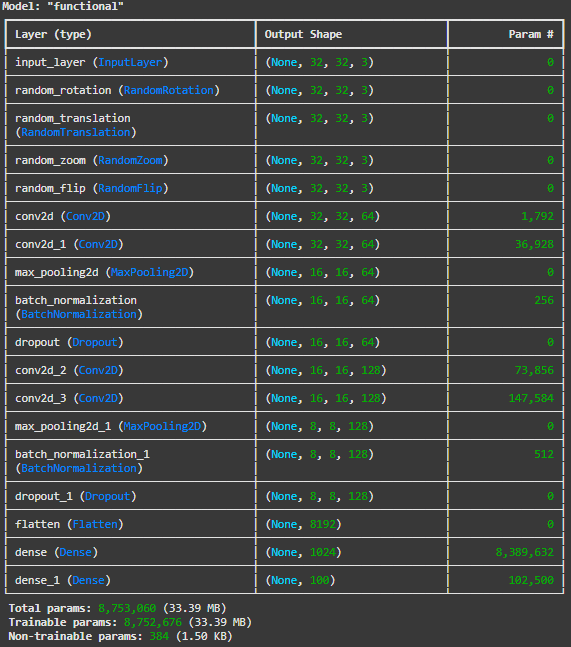
- Early Stopping
from keras.callbacks import EarlyStoppinges = EarlyStopping(monitor='val_loss', # 얼리스토핑 적용할 관측 대상
min_delta=0, # 임계값.
patience=3, # 성능 개선 미발생시 몇 epoch 더 진행할 것인가.
verbose=1,
restore_best_weights=True # 가장 성능 좋은 epoch의 가중치로 되돌림
)- .fit( )
model.fit(train_x_mm, train_y,
          validation_data=(val_x_mm, val_y),
          epochs=10000, verbose=1,
          callbacks=[es]                # 얼리스토핑 적용!
          )
Epoch 1/10000
1250/1250 ━━━━━━━━━━━━━━━━━━━━ 31s 19ms/step - accuracy: 0.0456 - loss: 4.5369 - val_accuracy: 0.0940 - val_loss: 3.9263
Epoch 2/10000
1250/1250 ━━━━━━━━━━━━━━━━━━━━ 23s 18ms/step - accuracy: 0.0948 - loss: 3.9055 - val_accuracy: 0.1098 - val_loss: 3.7984
Epoch 3/10000
1250/1250 ━━━━━━━━━━━━━━━━━━━━ 42s 19ms/step - accuracy: 0.1158 - loss: 3.7538 - val_accuracy: 0.1370 - val_loss: 3.6270
Epoch 4/10000
1250/1250 ━━━━━━━━━━━━━━━━━━━━ 40s 18ms/step - accuracy: 0.1286 - loss: 3.6649 - val_accuracy: 0.1374 - val_loss: 3.7671
Epoch 5/10000
1250/1250 ━━━━━━━━━━━━━━━━━━━━ 41s 18ms/step - accuracy: 0.1441 - loss: 3.5871 - val_accuracy: 0.1475 - val_loss: 3.7322
Epoch 6/10000
1250/1250 ━━━━━━━━━━━━━━━━━━━━ 41s 18ms/step - accuracy: 0.1539 - loss: 3.5368 - val_accuracy: 0.1592 - val_loss: 3.5241
Epoch 7/10000
1250/1250 ━━━━━━━━━━━━━━━━━━━━ 23s 19ms/step - accuracy: 0.1653 - loss: 3.4803 - val_accuracy: 0.1831 - val_loss: 3.4410
Epoch 8/10000
1250/1250 ━━━━━━━━━━━━━━━━━━━━ 41s 18ms/step - accuracy: 0.1703 - loss: 3.4352 - val_accuracy: 0.1794 - val_loss: 3.4417
Epoch 9/10000
1250/1250 ━━━━━━━━━━━━━━━━━━━━ 41s 18ms/step - accuracy: 0.1837 - loss: 3.3873 - val_accuracy: 0.1937 - val_loss: 3.3617
Epoch 10/10000
1250/1250 ━━━━━━━━━━━━━━━━━━━━ 42s 20ms/step - accuracy: 0.1846 - loss: 3.3526 - val_accuracy: 0.1812 - val_loss: 3.4366
Epoch 11/10000
1250/1250 ━━━━━━━━━━━━━━━━━━━━ 40s 19ms/step - accuracy: 0.1890 - loss: 3.3301 - val_accuracy: 0.1740 - val_loss: 3.4759
Epoch 12/10000
1250/1250 ━━━━━━━━━━━━━━━━━━━━ 40s 18ms/step - accuracy: 0.1934 - loss: 3.2969 - val_accuracy: 0.2229 - val_loss: 3.1815
Epoch 13/10000
1250/1250 ━━━━━━━━━━━━━━━━━━━━ 41s 18ms/step - accuracy: 0.1997 - loss: 3.2570 - val_accuracy: 0.2010 - val_loss: 3.3584
Epoch 14/10000
1250/1250 ━━━━━━━━━━━━━━━━━━━━ 41s 18ms/step - accuracy: 0.2046 - loss: 3.2396 - val_accuracy: 0.2056 - val_loss: 3.2955
Epoch 15/10000
1250/1250 ━━━━━━━━━━━━━━━━━━━━ 42s 19ms/step - accuracy: 0.2085 - loss: 3.2195 - val_accuracy: 0.1944 - val_loss: 3.4265
Epoch 15: early stopping
Restoring model weights from the end of the best epoch: 12.
<keras.src.callbacks.history.History at 0x781b022d8b80>- .evaluate( )
model.evaluate(test_x_mm, test_y)313/313 ━━━━━━━━━━━━━━━━━━━━ 1s 5ms/step - accuracy: 0.2255 - loss: 3.1848[3.178687810897827, 0.22519999742507935]- .predict( )
y_pred = model.predict(test_x_mm)313/313 ━━━━━━━━━━━━━━━━━━━━ 1s 3ms/step# 원핫 인코딩 한 것을 다시 묶어주는 코드
# 평가 지표 및 실제 데이터 확인을 위해 필요
y_pred_arg = np.argmax(y_pred, axis=1)
test_y_arg = np.argmax(test_y, axis=1)y_pred_arg[0]12test_y_arg[0]49- 평가 지표
from sklearn.metrics import accuracy_score, classification_reportaccuracy_score(test_y_arg, y_pred_arg)0.2252print( classification_report(test_y_arg, y_pred_arg, target_names=list(label_dict.values())) ) precision recall f1-score support
apple 0.59 0.46 0.52 100
aquarium_fish 0.33 0.30 0.31 100
baby 0.47 0.22 0.30 100
bear 0.09 0.03 0.05 100
beaver 0.14 0.03 0.05 100
bed 0.00 0.00 0.00 100
bee 0.19 0.30 0.23 100
beetle 0.16 0.31 0.21 100
bicycle 0.20 0.10 0.13 100
bottle 0.40 0.16 0.23 100
bowl 0.00 0.00 0.00 100
boy 0.17 0.04 0.06 100
bridge 0.23 0.10 0.14 100
bus 0.10 0.05 0.07 100
butterfly 0.14 0.19 0.16 100
camel 0.18 0.19 0.19 100
can 0.19 0.17 0.18 100
castle 0.28 0.25 0.26 100
caterpillar 0.31 0.27 0.29 100
cattle 0.11 0.04 0.06 100
chair 0.14 0.55 0.22 100
chimpanzee 0.33 0.40 0.36 100
clock 0.11 0.23 0.15 100
cloud 0.55 0.52 0.53 100
cockroach 0.27 0.62 0.37 100
couch 0.00 0.00 0.00 100
cra 0.20 0.11 0.14 100
crocodile 0.00 0.00 0.00 100
cup 0.10 0.03 0.05 100
dinosaur 0.14 0.09 0.11 100
dolphin 0.34 0.25 0.29 100
elephant 0.15 0.24 0.19 100
flatfish 0.17 0.07 0.10 100
forest 0.21 0.30 0.25 100
fox 0.22 0.10 0.14 100
girl 0.15 0.28 0.20 100
hamster 0.23 0.35 0.28 100
house 0.30 0.18 0.22 100
kangaroo 0.15 0.13 0.14 100
keyboard 0.18 0.38 0.25 100
lamp 0.50 0.04 0.07 100
lawn_mower 0.42 0.43 0.42 100
leopard 0.14 0.17 0.15 100
lion 0.12 0.52 0.20 100
lizard 0.18 0.07 0.10 100
lobster 0.15 0.16 0.16 100
man 0.26 0.16 0.20 100
maple_tree 0.29 0.32 0.31 100
motorcycle 0.16 0.55 0.24 100
mountain 0.58 0.14 0.23 100
mouse 0.00 0.00 0.00 100
mushroom 0.13 0.20 0.16 100
oak_tree 0.34 0.79 0.47 100
orange 0.36 0.72 0.48 100
orchid 0.32 0.51 0.39 100
otter 0.00 0.00 0.00 100
palm_tree 0.47 0.19 0.27 100
pear 0.33 0.15 0.21 100
pickup_truck 0.12 0.19 0.15 100
pine_tree 0.11 0.08 0.09 100
plain 0.77 0.30 0.43 100
plate 0.21 0.36 0.26 100
poppy 0.26 0.65 0.37 100
porcupine 0.13 0.09 0.11 100
possum 0.08 0.02 0.03 100
rabbit 0.07 0.03 0.04 100
raccoon 0.23 0.07 0.11 100
ray 0.41 0.32 0.36 100
road 0.78 0.35 0.48 100
rocket 0.42 0.36 0.39 100
rose 0.35 0.34 0.35 100
sea 0.44 0.22 0.29 100
seal 0.00 0.00 0.00 100
shark 0.33 0.38 0.35 100
shrew 0.09 0.05 0.06 100
skunk 0.24 0.59 0.34 100
skyscraper 0.53 0.36 0.43 100
snail 0.36 0.04 0.07 100
snake 0.06 0.20 0.09 100
spider 0.29 0.04 0.07 100
squirrel 0.00 0.00 0.00 100
streetcar 0.14 0.10 0.12 100
sunflower 0.49 0.84 0.62 100
sweet_pepper 0.33 0.16 0.21 100
table 0.32 0.07 0.11 100
tank 0.13 0.27 0.18 100
telephone 0.22 0.45 0.30 100
television 0.16 0.11 0.13 100
tiger 0.11 0.54 0.18 100
tractor 0.28 0.32 0.30 100
train 0.16 0.10 0.12 100
trout 0.33 0.01 0.02 100
tulip 0.13 0.04 0.06 100
turtle 0.21 0.18 0.19 100
wardrobe 0.46 0.22 0.30 100
whale 0.39 0.37 0.38 100
willow_tree 0.31 0.15 0.20 100
wolf 0.15 0.13 0.14 100
woman 0.21 0.11 0.14 100
worm 0.15 0.15 0.15 100
accuracy 0.23 10000
macro avg 0.24 0.23 0.20 10000
weighted avg 0.24 0.23 0.20 10000/usr/local/lib/python3.10/dist-packages/sklearn/metrics/_classification.py:1565: UndefinedMetricWarning: Precision is ill-defined and being set to 0.0 in labels with no predicted samples. Use `zero_division` parameter to control this behavior.
_warn_prf(average, modifier, f"{metric.capitalize()} is", len(result))
/usr/local/lib/python3.10/dist-packages/sklearn/metrics/_classification.py:1565: UndefinedMetricWarning: Precision is ill-defined and being set to 0.0 in labels with no predicted samples. Use `zero_division` parameter to control this behavior.
_warn_prf(average, modifier, f"{metric.capitalize()} is", len(result))
/usr/local/lib/python3.10/dist-packages/sklearn/metrics/_classification.py:1565: UndefinedMetricWarning: Precision is ill-defined and being set to 0.0 in labels with no predicted samples. Use `zero_division` parameter to control this behavior.
_warn_prf(average, modifier, f"{metric.capitalize()} is", len(result))Visualization
- 실제 데이터 확인
rand_idx = np.random.randint(0, len(y_pred_arg))
test_idx = test_y_arg[rand_idx]
pred_idx = y_pred_arg[rand_idx]
class_prob = np.floor( y_pred[rand_idx]*100 )

print(f'idx = {rand_idx}')
print(f'해당 인덱스의 이미지는 {label_dict[test_idx]}')
print(f'모델의 예측 : {label_dict[pred_idx]}')
print(f'모델의 클래스별 확률 : ')
print('-------------------')
for idx, val in enumerate( list(label_dict.values()) ) :
    print(val, class_prob[idx])
print('=================================================')

if test_y_arg[rand_idx] == y_pred_arg[rand_idx] :
    print('정답')
else :
    print('땡')

plt.imshow(test_x[rand_idx])
plt.show()
idx = 1630
해당 인덱스의 이미지는 orchid
모델의 예측 : orchid
모델의 클래스별 확률 :
-------------------
apple 0.0
aquarium_fish 0.0
baby 0.0
bear 0.0
beaver 0.0
bed 0.0
bee 0.0
beetle 0.0
bicycle 0.0
bottle 0.0
bowl 0.0
boy 0.0
bridge 0.0
bus 0.0
butterfly 0.0
camel 0.0
can 0.0
castle 0.0
caterpillar 0.0
cattle 0.0
chair 0.0
chimpanzee 0.0
clock 0.0
cloud 0.0
cockroach 0.0
couch 0.0
cra 0.0
crocodile 0.0
cup 0.0
dinosaur 0.0
dolphin 0.0
elephant 0.0
flatfish 0.0
forest 0.0
fox 0.0
girl 0.0
hamster 0.0
house 0.0
kangaroo 0.0
keyboard 0.0
lamp 0.0
lawn_mower 0.0
leopard 0.0
lion 0.0
lizard 0.0
lobster 0.0
man 0.0
maple_tree 0.0
motorcycle 0.0
mountain 0.0
mouse 0.0
mushroom 0.0
oak_tree 0.0
orange 0.0
orchid 66.0
otter 0.0
palm_tree 0.0
pear 0.0
pickup_truck 0.0
pine_tree 0.0
plain 0.0
plate 0.0
poppy 3.0
porcupine 0.0
possum 0.0
rabbit 0.0
raccoon 0.0
ray 0.0
road 0.0
rocket 0.0
rose 19.0
sea 0.0
seal 0.0
shark 0.0
shrew 0.0
skunk 0.0
skyscraper 0.0
snail 0.0
snake 0.0
spider 0.0
squirrel 0.0
streetcar 0.0
sunflower 0.0
sweet_pepper 0.0
table 0.0
tank 0.0
telephone 0.0
television 0.0
tiger 0.0
tractor 0.0
train 0.0
trout 0.0
tulip 8.0
turtle 0.0
wardrobe 0.0
whale 0.0
willow_tree 0.0
wolf 0.0
woman 0.0
worm 0.0
=================================================
정답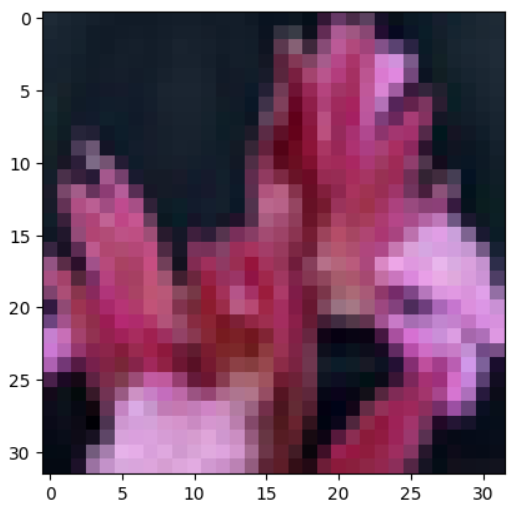
- 틀린 이미지만 확인해보기
temp = (test_y_arg == y_pred_arg)
false_idx = np.where(temp==False)[0]
false_len = len(false_idx)
false_len7748rand_idx = false_idx[np.random.randint(0, false_len)]
test_idx = test_y_arg[rand_idx]
pred_idx = y_pred_arg[rand_idx]
class_prob = np.floor( y_pred[rand_idx]*100 )
print(f'idx = {rand_idx}')
print(f'해당 인덱스의 이미지는 {label_dict[test_idx]}')
print(f'모델의 예측 : {label_dict[pred_idx]}')
print(f'모델의 클래스별 확률 : ')
print('-------------------')
for idx, val in enumerate( list(label_dict.values()) ) :
print(val, class_prob[idx])
print('=================================================')
if test_y_arg[rand_idx] == y_pred_arg[rand_idx] :
print('정답')
else :
print('땡')
plt.imshow(test_x[rand_idx] )
plt.show()idx = 1471
해당 인덱스의 이미지는 couch
모델의 예측 : streetcar
모델의 클래스별 확률 :
-------------------
apple 0.0
aquarium_fish 0.0
baby 1.0
bear 1.0
beaver 1.0
bed 1.0
bee 1.0
beetle 2.0
bicycle 0.0
bottle 1.0
bowl 1.0
boy 1.0
bridge 0.0
bus 3.0
butterfly 3.0
camel 0.0
can 3.0
castle 0.0
caterpillar 0.0
cattle 2.0
chair 0.0
chimpanzee 2.0
clock 1.0
cloud 0.0
cockroach 2.0
couch 1.0
cra 1.0
crocodile 0.0
cup 0.0
dinosaur 0.0
dolphin 0.0
elephant 1.0
flatfish 2.0
forest 0.0
fox 0.0
girl 1.0
hamster 0.0
house 1.0
kangaroo 0.0
keyboard 0.0
lamp 0.0
lawn_mower 1.0
leopard 0.0
lion 0.0
lizard 0.0
lobster 2.0
man 0.0
maple_tree 0.0
motorcycle 3.0
mountain 0.0
mouse 0.0
mushroom 0.0
oak_tree 0.0
orange 0.0
orchid 0.0
otter 1.0
palm_tree 0.0
pear 0.0
pickup_truck 6.0
pine_tree 0.0
plain 0.0
plate 0.0
poppy 0.0
porcupine 0.0
possum 0.0
rabbit 0.0
raccoon 0.0
ray 0.0
road 0.0
rocket 0.0
rose 0.0
sea 0.0
seal 0.0
shark 0.0
shrew 0.0
skunk 0.0
skyscraper 0.0
snail 0.0
snake 1.0
spider 0.0
squirrel 0.0
streetcar 6.0
sunflower 0.0
sweet_pepper 0.0
table 1.0
tank 0.0
telephone 1.0
television 3.0
tiger 1.0
tractor 3.0
train 3.0
trout 0.0
tulip 0.0
turtle 0.0
wardrobe 0.0
whale 0.0
willow_tree 0.0
wolf 0.0
woman 1.0
worm 0.0
=================================================
땡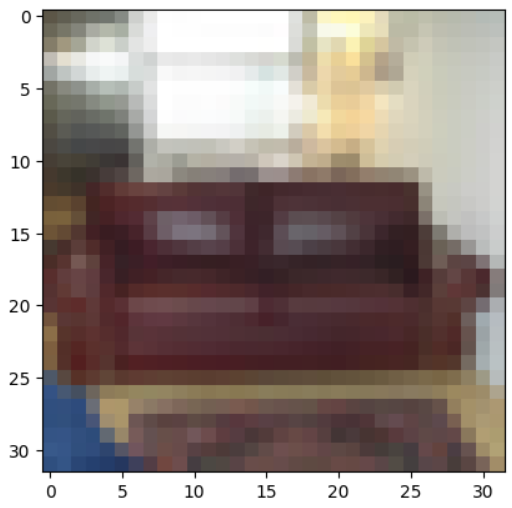
'AI_딥 러닝_시각지능' 카테고리의 다른 글
| AI_파이썬_시각지능_CNN_남이 만든 CNN모델(Pretrained ) (0) | 2025.01.02 |
|---|---|
| AI_파이썬_시각지능_CNN_MyModel_Save&Load_2024 (0) | 2025.01.02 |
| AI_파이썬_시각지능_CNN_SmallSize_notMNIST_2024 (0) | 2024.12.30 |
| AI_파이썬_시각지능_CNN_Image_SmallData2024 (0) | 2024.12.30 |
| AI_파이썬_시각지능_CNN_exercise_notMNIST_small_2024 (0) | 2024.12.30 |
