Keras Upgrade
!pip install keras-nightlyCollecting keras-nightly
Downloading keras_nightly-3.7.0.dev2024123003-py3-none-any.whl.metadata (5.8 kB)
Requirement already satisfied: absl-py in /usr/local/lib/python3.10/dist-packages (from keras-nightly) (1.4.0)
Requirement already satisfied: numpy in /usr/local/lib/python3.10/dist-packages (from keras-nightly) (1.26.4)
Requirement already satisfied: rich in /usr/local/lib/python3.10/dist-packages (from keras-nightly) (13.9.4)
Requirement already satisfied: namex in /usr/local/lib/python3.10/dist-packages (from keras-nightly) (0.0.8)
Requirement already satisfied: h5py in /usr/local/lib/python3.10/dist-packages (from keras-nightly) (3.12.1)
Requirement already satisfied: optree in /usr/local/lib/python3.10/dist-packages (from keras-nightly) (0.13.1)
Requirement already satisfied: ml-dtypes in /usr/local/lib/python3.10/dist-packages (from keras-nightly) (0.4.1)
Requirement already satisfied: packaging in /usr/local/lib/python3.10/dist-packages (from keras-nightly) (24.2)
Requirement already satisfied: typing-extensions>=4.5.0 in /usr/local/lib/python3.10/dist-packages (from optree->keras-nightly) (4.12.2)
Requirement already satisfied: markdown-it-py>=2.2.0 in /usr/local/lib/python3.10/dist-packages (from rich->keras-nightly) (3.0.0)
Requirement already satisfied: pygments<3.0.0,>=2.13.0 in /usr/local/lib/python3.10/dist-packages (from rich->keras-nightly) (2.18.0)
Requirement already satisfied: mdurl~=0.1 in /usr/local/lib/python3.10/dist-packages (from markdown-it-py>=2.2.0->rich->keras-nightly) (0.1.2)
Downloading keras_nightly-3.7.0.dev2024123003-py3-none-any.whl (1.3 MB)
━━━━━━━━━━━━━━━━━━━━━━━━━━━━━━━━━━━━━━━━ 1.3/1.3 MB 17.8 MB/s eta 0:00:00
Installing collected packages: keras-nightly
Successfully installed keras-nightly-3.7.0.dev2024123003Letter recognition (small size)
Indeed, I once even proposed that the toughest challenge facing AI workers is to answer the question: “What are the letters ‘A’ and ‘I’? - Douglas R. Hofstadter (1995)
notMNIST
Data source: notMNIST (you need to download notMNIST_small.mat file):

some publicly available fonts and extracted glyphs from them to make a dataset similar to MNIST. There are 10 classes, with letters A-J taken from different fonts.
Approaching 0.5% error rate on notMNIST_small would be very impressive. If you run your algorithm on this dataset, please let me know your results.
So, why not MNIST?
Many introductions to image classification with deep learning start with MNIST, a standard dataset of handwritten digits. This is unfortunate. Not only does it not produce a “Wow!” effect or show where deep learning shines, but it also can be solved with shallow machine learning techniques. In this case, plain k-Nearest Neighbors produces more than 97% accuracy (or even 99.5% with some data preprocessing!). Moreover, MNIST is not a typical image dataset – and mastering it is unlikely to teach you transferable skills that would be useful for other classification problems
Many good ideas will not work well on MNIST (e.g. batch norm). Inversely many bad ideas may work on MNIST and no[t] transfer to real [computer vision]. - François Chollet’s tweet
!wget http://yaroslavvb.com/upload/notMNIST/notMNIST_small.mat--2024-12-30 09:15:45-- http://yaroslavvb.com/upload/notMNIST/notMNIST_small.mat
Resolving yaroslavvb.com (yaroslavvb.com)... 129.121.4.193
Connecting to yaroslavvb.com (yaroslavvb.com)|129.121.4.193|:80... connected.
HTTP request sent, awaiting response... 200 OK
Length: 117586976 (112M)
Saving to: ‘notMNIST_small.mat’
notMNIST_small.mat 100%[===================>] 112.14M 71.6MB/s in 1.6s
2024-12-30 09:15:47 (71.6 MB/s) - ‘notMNIST_small.mat’ saved [117586976/117586976]import numpy as np
import matplotlib.pyplot as plt
from scipy import ioData Loading
data = io.loadmat('notMNIST_small.mat')

data
# 데이터 확인
{'__header__': b'MATLAB 5.0 MAT-file Platform: posix, Created on: Wed Aug 10 11:38:32 2011',
'__version__': '1.0',
'__globals__': [],
'images': array([[[ 0., 0., 0., ..., 0., 0., 0.],
[ 0., 1., 0., ..., 0., 0., 0.],
[ 0., 0., 0., ..., 0., 0., 0.],
...,
[255., 0., 215., ..., 0., 160., 124.],
[255., 0., 227., ..., 0., 122., 72.],
[255., 0., 156., ..., 0., 0., 12.]],
[[ 0., 0., 0., ..., 0., 0., 0.],
[ 0., 19., 0., ..., 0., 0., 0.],
[ 0., 93., 0., ..., 0., 0., 0.],
...,
[255., 0., 255., ..., 0., 255., 255.],
[255., 0., 110., ..., 0., 206., 227.],
[255., 0., 21., ..., 0., 0., 63.]],
[[ 0., 3., 0., ..., 0., 0., 0.],
[ 0., 167., 0., ..., 0., 0., 0.],
[ 0., 255., 0., ..., 1., 1., 0.],
...,
[255., 0., 223., ..., 1., 252., 255.],
[255., 0., 0., ..., 0., 192., 228.],
[255., 0., 0., ..., 0., 0., 68.]],
...,
[[189., 0., 138., ..., 0., 0., 0.],
[253., 0., 255., ..., 0., 0., 0.],
[251., 55., 255., ..., 1., 2., 1.],
...,
[ 0., 251., 0., ..., 1., 3., 255.],
[ 2., 255., 0., ..., 0., 0., 228.],
[ 0., 209., 0., ..., 0., 0., 70.]],
[[237., 3., 75., ..., 0., 0., 0.],
[255., 2., 64., ..., 0., 0., 0.],
[255., 0., 90., ..., 0., 0., 0.],
...,
[ 2., 254., 0., ..., 0., 0., 248.],
[ 0., 255., 0., ..., 0., 0., 203.],
[ 0., 99., 0., ..., 0., 0., 51.]],
[[ 99., 0., 0., ..., 0., 0., 0.],
[128., 0., 0., ..., 0., 0., 0.],
[154., 3., 0., ..., 0., 0., 0.],
...,
[ 0., 175., 0., ..., 0., 0., 63.],
[ 0., 75., 0., ..., 0., 0., 22.],
[ 0., 0., 0., ..., 0., 0., 1.]]]),
'labels': array([9., 9., 9., ..., 2., 2., 2.])}# 타겟 나누기
x = data['images']
y = data['labels']x.shape, y.shape((28, 28, 18724), (18724,))resolution = 28
classes = 10
x = np.transpose(x, (2, 0, 1))
print(x.shape)
x = x.reshape( (\-1, resolution, resolution, 1) )(18724, 28, 28)# sample, x, y, channel
x.shape, y.shape((18724, 28, 28, 1), (18724,))- 데이터 살펴보기
# 랜덤 데이터 확인.
rand_i = np.random.randint(0, x.shape[0])

plt.title( f'idx: {rand_i} , y: {"ABCDEFGHIJ"[ int(y[rand_i]) ]}' )
plt.imshow( x[rand_i, :, :, 0], cmap='gray' )
plt.show()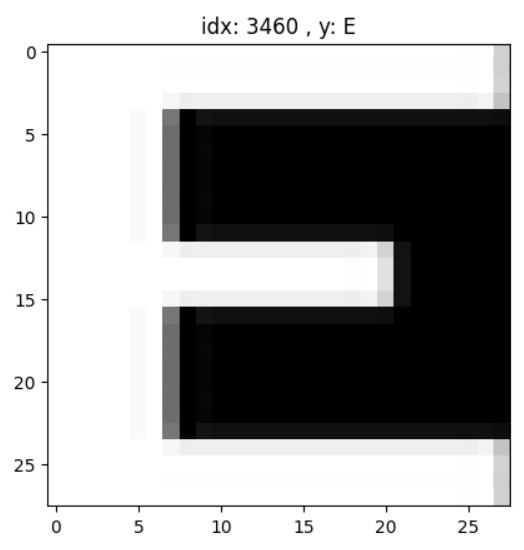
# 데이터 전체 보기.
rows = 5
fig, axes = plt.subplots(rows, classes, figsize=(classes,rows))

for letter_id in range(classes) :
    letters = x[y==letter_id]      # 0부터 9까지 각 숫자에 맞는 array가 letters에 들어간다.
    letters_len = len(letters)

    for row_i in range(rows) :
        axe = axes[row_i, letter_id]
        axe.imshow( letters[np.random.randint(letters_len)], cmap='gray', interpolation='none')
        axe.axis('off')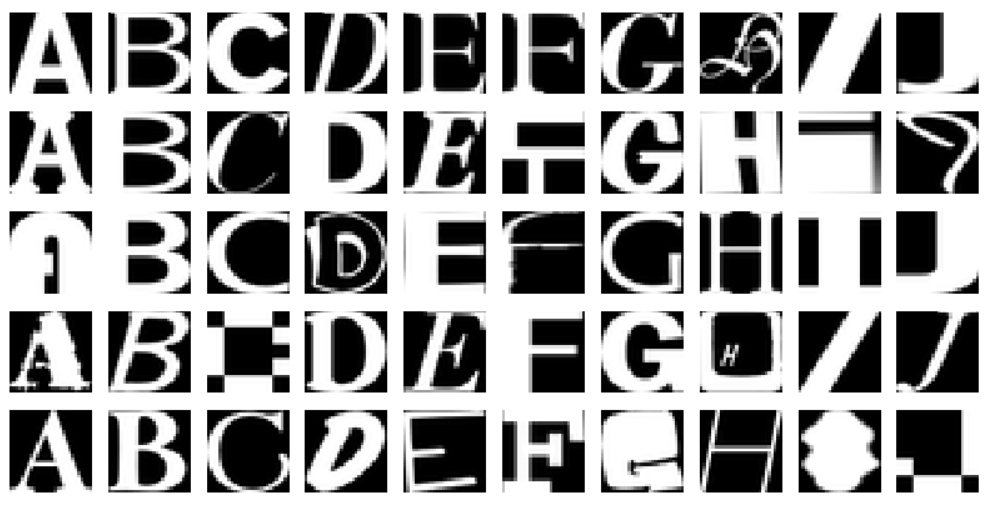
Data Preprocessing
- Data split
- training set : test set = 8 : 2
- 재현을 위한 난수 고정 : 2024
fig
- Scaling
- min-max scaling
from sklearn.model_selection import train_test_split

x_train, x_val, y_train, y_val = train_test_split(x, y, test_size=0.2, random_state=2024)y_train.shape(14979,)x_train.max(), x_train.min()(255.0, 0.0)x_train = (x_train - x_train.min()) / (x_train.max() - x_train.min())
x_val = (x_val - x_val.min()) / (x_val.max() - x_val.min())
# x_train = x_train/255.0
# x_val = x_val/255.0- One-hot encoding
from keras.utils import to_categorical

y_train = to_categorical(y_train, num_classes=10)
y_val = to_categorical(y_val, num_classes=10)y_train.shape(14979, 10)- Data shape 재확인
x_train.shape, y_train.shape, x_val.shape, y_val.shape((14979, 28, 28, 1), (14979, 10), (3745, 28, 28, 1), (3745, 10))Modeling
- 조건
- Sequential API, Functional API 중 택일
- Flatten Layer 사용할 것
- Activation Function이 주어진 Dense Layer 뒤에 BatchNormalization 사용할 것
- Dropout을 0.2 정도로 사용할 것
- Early Stopping을 사용할 것
import keras

keras.__version__3.7.0.dev2024123003from tensorflow.keras.models import Sequential
from tensorflow.keras.layers import Flatten, Dense, BatchNormalization, Dropout
from tensorflow.keras.callbacks import EarlyStopping
keras.utils.clear_session()
model = Sequential()
model.add(Flatten(input_shape=(28, 28, 1)))
# Dense Layer
model.add(Dense(128, activation='relu'))
# Batch Normalization
model.add(BatchNormalization())
# Dropout
model.add(Dropout(0.2))
# 출력 레이어
model.add(Dense(10, activation='softmax')) # 예: 10개의 클래스
model.summary()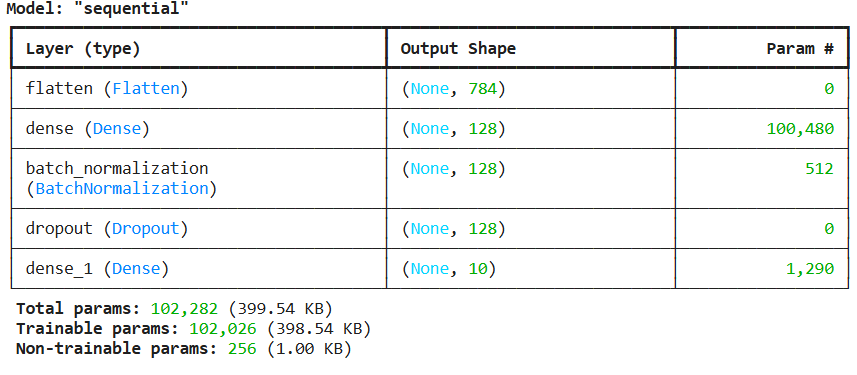
#Sequential API

keras.utils.clear_session()

model = Sequential()

model.add(keras.layers.Flatten(input_shape=(28, 28, 1)))
model.add(keras.layers.Dense(128, activation='relu'))
model.add(keras.layers.BatchNormalization())
model.add(keras.layers.Dropout(0.2))
model.add(keras.layers.Dense(64, activation='relu'))
model.add(keras.layers.BatchNormalization())
model.add(keras.layers.Dropout(0.2))
model.add(keras.layers.Dense(32, activation='relu'))
model.add(keras.layers.BatchNormalization())
model.add(keras.layers.Dropout(0.2))
model.add(keras.layers.Dense(16, activation='relu'))
model.add(keras.layers.BatchNormalization())
model.add(keras.layers.Dropout(0.2))
model.add(keras.layers.Dense(10, activation='softmax'))

model.summary()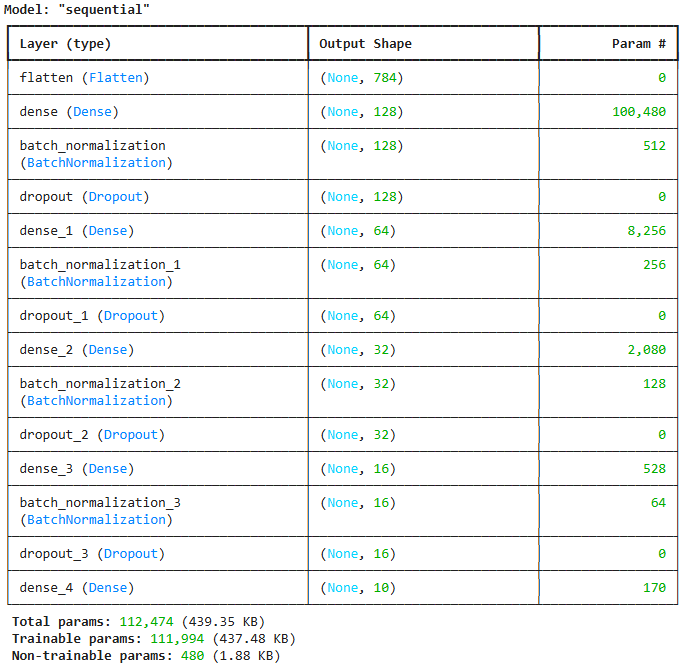
#Functional API

keras.utils.clear_session()


il = keras.layers.Input(shape=(28, 28, 1))
hl = keras.layers.Flatten()(il)
hl = keras.layers.Dense(128, activation='relu')(hl)
hl = keras.layers.BatchNormalization()(hl)
hl = keras.layers.Dropout(0.2)(hl)
hl = keras.layers.Dense(64, activation='relu')(hl)
hl = keras.layers.BatchNormalization()(hl)
hl = keras.layers.Dropout(0.2)(hl)
hl = keras.layers.Dense(32, activation='relu')(hl)
hl = keras.layers.BatchNormalization()(hl)
hl = keras.layers.Dropout(0.2)(hl)
hl = keras.layers.Dense(16, activation='relu')(hl)
hl = keras.layers.BatchNormalization()(hl)
hl = keras.layers.Dropout(0.2)(hl)
ol = keras.layers.Dense(10, activation='softmax')(hl)

model = keras.models.Model(il, ol)

model.summary()
# 모델 컴파일
model.compile(optimizer= 'adam', loss='categorical_crossentropy', metrics=['accuracy'])- Early stopping
#EarlyStopping
es = EarlyStopping(monitor = 'val_loss',            # 얼리스토핑을 적용할 지표
                   min_delta = 0,                   # threshold. 이 값보다 더 크게 지표가 변화해야 성능
                   patience = 3,                    # 성능 개선이 발생하지 않을 때, 몇 epohs 더 지켜 볼 것인지.
                   verbose = 1,                     # 적용된 epohs 알려줌
restore_best_weights=True) # 최적의 가중치를 모델에 다시 전달.- .fit( )
hist = model.fit(x_train, y_train, validation_split=(0.2), epochs=50, callbacks=[es])Epoch 1/50
375/375 ━━━━━━━━━━━━━━━━━━━━ 18s 17ms/step - accuracy: 0.4670 - loss: 1.6505 - val_accuracy: 0.8708 - val_loss: 0.4706
Epoch 2/50
375/375 ━━━━━━━━━━━━━━━━━━━━ 6s 6ms/step - accuracy: 0.7925 - loss: 0.7490 - val_accuracy: 0.8868 - val_loss: 0.3910
Epoch 3/50
375/375 ━━━━━━━━━━━━━━━━━━━━ 3s 6ms/step - accuracy: 0.8408 - loss: 0.5964 - val_accuracy: 0.8925 - val_loss: 0.3660
Epoch 4/50
375/375 ━━━━━━━━━━━━━━━━━━━━ 2s 6ms/step - accuracy: 0.8467 - loss: 0.5363 - val_accuracy: 0.8995 - val_loss: 0.3441
Epoch 5/50
375/375 ━━━━━━━━━━━━━━━━━━━━ 3s 7ms/step - accuracy: 0.8624 - loss: 0.5018 - val_accuracy: 0.8979 - val_loss: 0.3476
Epoch 6/50
375/375 ━━━━━━━━━━━━━━━━━━━━ 5s 5ms/step - accuracy: 0.8733 - loss: 0.4663 - val_accuracy: 0.9012 - val_loss: 0.3311
Epoch 7/50
375/375 ━━━━━━━━━━━━━━━━━━━━ 3s 6ms/step - accuracy: 0.8843 - loss: 0.4448 - val_accuracy: 0.9002 - val_loss: 0.3413
Epoch 8/50
375/375 ━━━━━━━━━━━━━━━━━━━━ 3s 6ms/step - accuracy: 0.8808 - loss: 0.4431 - val_accuracy: 0.8959 - val_loss: 0.3538
Epoch 9/50
375/375 ━━━━━━━━━━━━━━━━━━━━ 3s 7ms/step - accuracy: 0.8855 - loss: 0.4302 - val_accuracy: 0.9009 - val_loss: 0.3217
Epoch 10/50
375/375 ━━━━━━━━━━━━━━━━━━━━ 5s 6ms/step - accuracy: 0.8875 - loss: 0.4290 - val_accuracy: 0.9075 - val_loss: 0.3171
Epoch 11/50
375/375 ━━━━━━━━━━━━━━━━━━━━ 2s 6ms/step - accuracy: 0.8928 - loss: 0.4019 - val_accuracy: 0.9019 - val_loss: 0.3339
Epoch 12/50
375/375 ━━━━━━━━━━━━━━━━━━━━ 4s 10ms/step - accuracy: 0.9010 - loss: 0.3747 - val_accuracy: 0.8972 - val_loss: 0.3409
Epoch 13/50
375/375 ━━━━━━━━━━━━━━━━━━━━ 5s 14ms/step - accuracy: 0.8934 - loss: 0.3914 - val_accuracy: 0.9062 - val_loss: 0.3409
Epoch 13: early stopping
Restoring model weights from the end of the best epoch: 10.- .evaluate( )
model.evaluate(x_val, y_val)118/118 ━━━━━━━━━━━━━━━━━━━━ 0s 3ms/step - accuracy: 0.9201 - loss: 0.2764[0.3008823096752167, 0.9118825197219849]- .predict( )
# 원핫 인코딩 한 것을 다시 묶어주는 코드
# 평가 지표 및 실제 데이터 확인을 위해 필요
y_pred = model.predict(x_val)

y_pred_arg = np.argmax(y_pred, axis=1)
test_y_arg = np.argmax(y_val, axis=1)
118/118 ━━━━━━━━━━━━━━━━━━━━ 1s 3ms/stepy_pred_arg.shape
y_pred_arg[:5]array([0, 5, 3, 2, 1])- 평가 지표
from sklearn.metrics import classification_reportfrom sklearn.metrics import *
class_names = ['A', 'B', 'C', 'D', 'E', 'F',' G', 'H', 'I', 'J']
print( classification_report(test_y_arg, y_pred_arg, target_names=class_names) ) precision recall f1-score support
A 0.94 0.88 0.91 360
B 0.95 0.89 0.92 382
C 0.92 0.94 0.93 385
D 0.87 0.95 0.91 373
E 0.93 0.87 0.90 364
F 0.92 0.95 0.94 392
G 0.88 0.91 0.90 390
H 0.94 0.91 0.93 364
I 0.85 0.88 0.87 360
J 0.92 0.94 0.93 375
accuracy 0.91 3745
macro avg 0.91 0.91 0.91 3745
weighted avg 0.91 0.91 0.91 3745Visualization
- 실제 데이터 확인
letters_str = "ABCDEFGHIJ"

rand_idx = np.random.randint(0, len(y_pred_arg))
test_idx = test_y_arg[rand_idx]
pred_idx = y_pred_arg[rand_idx]
class_prob = np.floor( y_pred[rand_idx]*100 )

print(f'idx = {rand_idx}')
print(f'해당 인덱스의 이미지는 {letters_str[test_idx]}')
print(f'모델의 예측 : {letters_str[pred_idx]}')
print(f'모델의 클래스별 확률 : ')
print('-------------------')
for idx, val in enumerate(letters_str) :
    print(val, class_prob[idx])
print('=================================================')

if test_y_arg[rand_idx] == y_pred_arg[rand_idx] :
    print('정답')
else :
    print('땡')

plt.imshow(x_val[rand_idx], cmap='gray')
plt.show()
idx = 2561
해당 인덱스의 이미지는 D
모델의 예측 : D
모델의 클래스별 확률 :
-------------------
A 0.0
B 0.0
C 0.0
D 99.0
E 0.0
F 0.0
G 0.0
H 0.0
I 0.0
J 0.0
=================================================
정답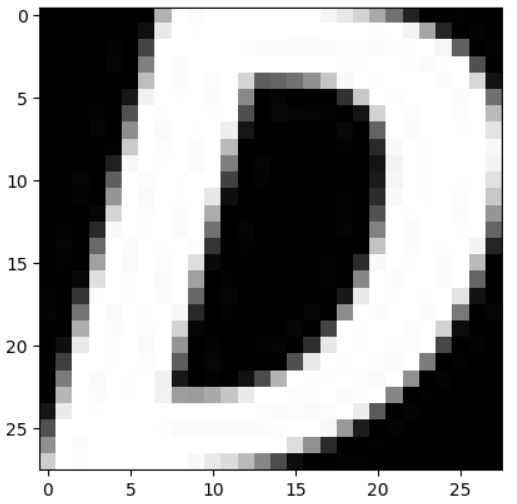
- 틀린 이미지만 확인해보기
temp = (y_val == y_pred)
false_idx = np.where(temp==False)[0]
false_len = len(false_idx)
false_len37450letters_str = "ABCDEFGHIJ"
rand_idx = false_idx[np.random.randint(0, false_len)]
test_idx = test_y_arg[rand_idx]
pred_idx = y_pred_arg[rand_idx]
class_prob = np.floor( y_pred[rand_idx]*100 )
print(f'idx = {rand_idx}')
print(f'해당 인덱스의 이미지는 {letters_str[test_idx]}')
print(f'모델의 예측 : {letters_str[pred_idx]}')
print(f'모델의 클래스별 확률 : ')
print('-------------------')
for idx, val in enumerate(letters_str) :
print(val, class_prob[idx])
print('=================================================')
if test_y_arg[rand_idx] == y_pred_arg[rand_idx] :
print('정답')
else :
print('땡')
plt.imshow(x_val[rand_idx], cmap='gray')
plt.show()idx = 2067
해당 인덱스의 이미지는 F
모델의 예측 : G
모델의 클래스별 확률 :
-------------------
A 0.0
B 1.0
C 1.0
D 18.0
E 0.0
F 1.0
G 68.0
H 0.0
I 1.0
J 4.0
=================================================
땡
'AI_딥 러닝_시각지능' 카테고리의 다른 글
| AI_파이썬_시각지능_CNN_Image_SmallData2024 (0) | 2024.12.30 |
|---|---|
| AI_파이썬_시각지능_CNN_exercise_notMNIST_small_2024 (0) | 2024.12.30 |
| AI_파이썬_시각지능_CNN_exercise_CIFAR10_2024 (1) | 2024.12.30 |
| AI_파이썬_시각지능_CNN_exercise_Fashion_MNIST_2024 (0) | 2024.12.30 |
| AI_파이썬_시각지능_CNN_2024 (0) | 2024.12.30 |


