My First Convolutional Neural Network : MNIST
일단 Quick 하게
코드는 정말 수루룩 끝난다!
그래서 다시 한 번! 아래 그림을 보고 구조를 확실히 추적할 수 있어야 한다.
Ex1.
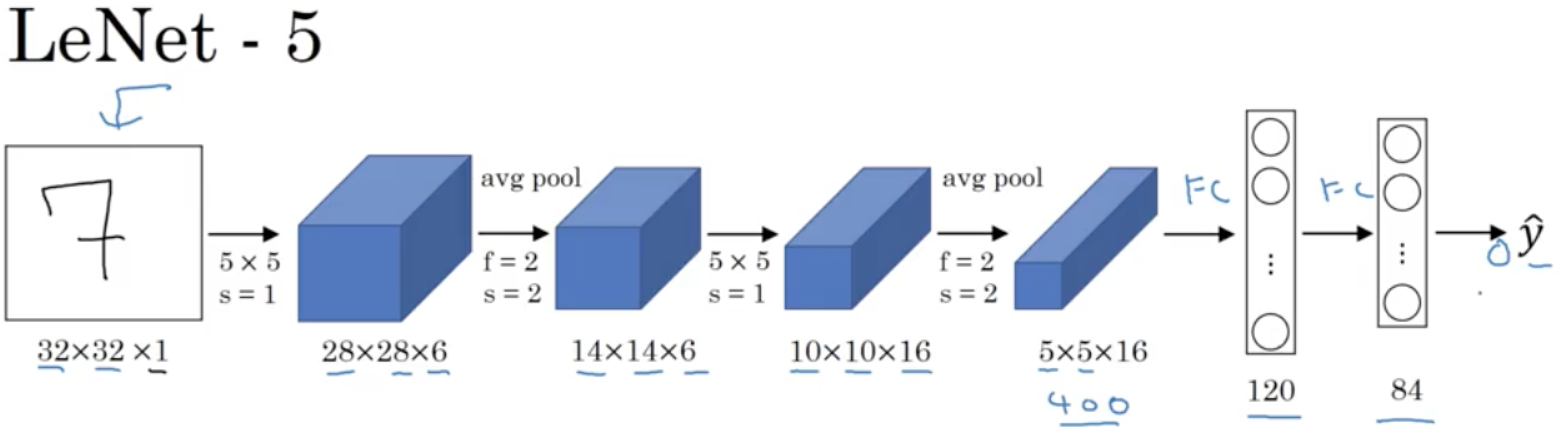
Ex2.
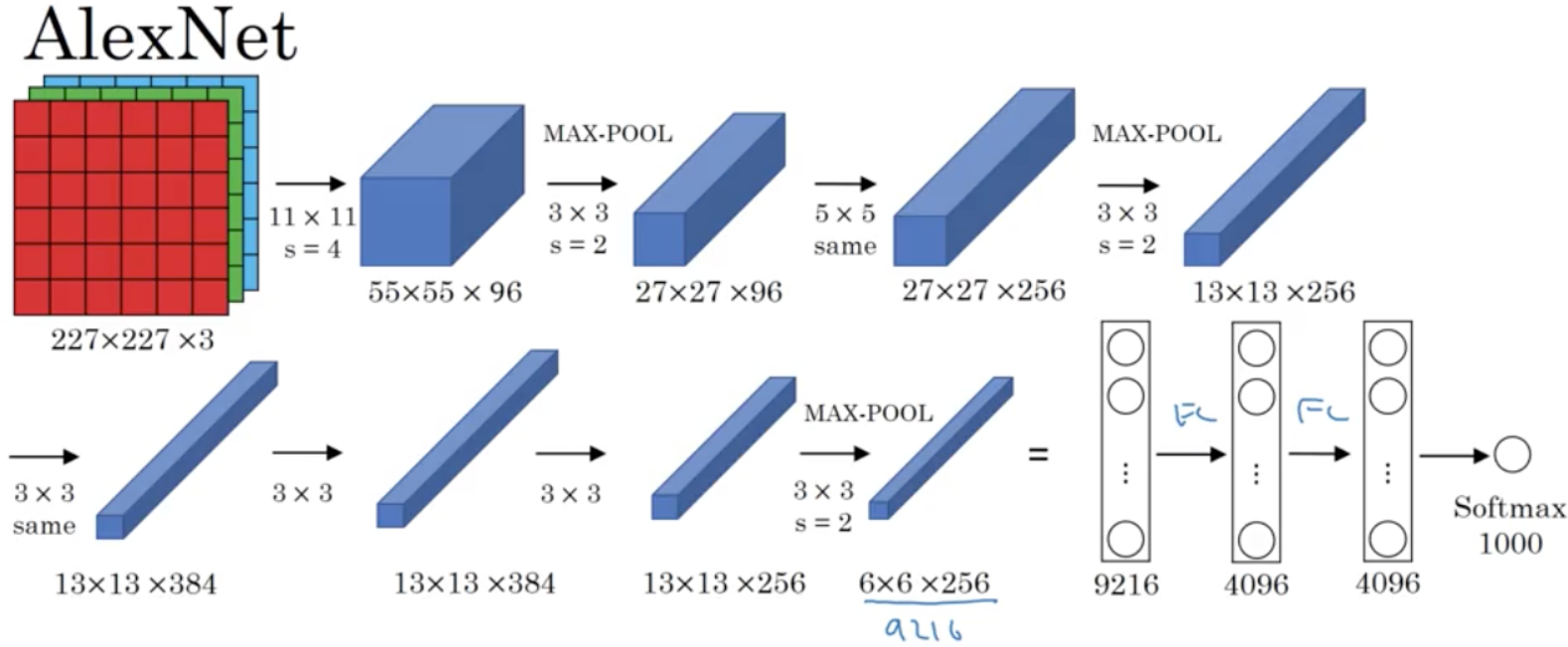
Keras Upgrade
!pip install keras-nightlyCollecting keras-nightly
Downloading keras_nightly-3.6.0.dev2024101603-py3-none-any.whl.metadata (5.8 kB)
Requirement already satisfied: absl-py in /usr/local/lib/python3.10/dist-packages (from keras-nightly) (1.4.0)
Requirement already satisfied: numpy in /usr/local/lib/python3.10/dist-packages (from keras-nightly) (1.26.4)
Requirement already satisfied: rich in /usr/local/lib/python3.10/dist-packages (from keras-nightly) (13.9.2)
Requirement already satisfied: namex in /usr/local/lib/python3.10/dist-packages (from keras-nightly) (0.0.8)
Requirement already satisfied: h5py in /usr/local/lib/python3.10/dist-packages (from keras-nightly) (3.11.0)
Requirement already satisfied: optree in /usr/local/lib/python3.10/dist-packages (from keras-nightly) (0.13.0)
Requirement already satisfied: ml-dtypes in /usr/local/lib/python3.10/dist-packages (from keras-nightly) (0.4.1)
Requirement already satisfied: packaging in /usr/local/lib/python3.10/dist-packages (from keras-nightly) (24.1)
Requirement already satisfied: typing-extensions>=4.5.0 in /usr/local/lib/python3.10/dist-packages (from optree->keras-nightly) (4.12.2)
Requirement already satisfied: markdown-it-py>=2.2.0 in /usr/local/lib/python3.10/dist-packages (from rich->keras-nightly) (3.0.0)
Requirement already satisfied: pygments<3.0.0,>=2.13.0 in /usr/local/lib/python3.10/dist-packages (from rich->keras-nightly) (2.18.0)
Requirement already satisfied: mdurl~=0.1 in /usr/local/lib/python3.10/dist-packages (from markdown-it-py>=2.2.0->rich->keras-nightly) (0.1.2)
Downloading keras_nightly-3.6.0.dev2024101603-py3-none-any.whl (1.2 MB)
━━━━━━━━━━━━━━━━━━━━━━━━━━━━━━━━━━━━━━━━ 1.2/1.2 MB 15.2 MB/s eta 0:00:00
Installing collected packages: keras-nightly
Successfully installed keras-nightly-3.6.0.dev2024101603라이브러리 로딩
import numpy as np
import pandas as pd
import matplotlib.pyplot as plt

import random as rd
from sklearn.metrics import accuracy_score

import keras
(train_x, train_y), (test_x, test_y) = keras.datasets.mnist.load_data()Downloading data from https://storage.googleapis.com/tensorflow/tf-keras-datasets/mnist.npz
11490434/11490434 ━━━━━━━━━━━━━━━━━━━━ 0s 0us/stepprint(train_x.shape, train_y.shape, test_x.shape, test_y.shape)(60000, 28, 28) (60000,) (10000, 28, 28) (10000,)'''
Ctrl+Enter를 이용하여
반복 실행 해보자!
'''
id = rd.randrange(0, 10000)
print(f'id = {id}')
print(f'다음 그림은 숫자 {test_y[id]} 입니다.')
plt.imshow(test_x[id], cmap='gray')
plt.show()
Convolutional Layer를 사용하기 위한 reshape!
- 채널이 추가되어야 한다
train_x.shape, test_x.shape((60000, 28, 28), (10000, 28, 28))train_x = train_x.reshape(-1, 28, 28, 1)
test_x = test_x.reshape(-1, 28, 28, 1)train_x.shape, test_x.shape((60000, 28, 28, 1), (10000, 28, 28, 1))- 이미지가 0 ~ 1 사이 값을 갖도록 스케일 조정!
print(f'max : {train_x.max()} , min : {train_x.min()}')max : 255 , min : 0# train_x = train_x / 255.
# test_x = test_X / 255.max_n, min_n = train_x.max(), train_x.min()train_x = (train_x - min_n) / (max_n - min_n)
test_x = (test_x - min_n) / (max_n - min_n)print(f'max : {train_x.max()} , min : {train_x.min()}')max : 1.0 , min : 0.0- One-hot Encoding
from keras.utils import to_categoricaltrain_y.shape, test_y.shape, len(np.unique(train_y))((60000,), (10000,), 10)class_n = len(np.unique(train_y))## 주의점!
## 1.반복 실행 하면 에러 없이 차원이 지속적으로 차원이 생성됨.
## 2.자동으로 클래스 수를 세서 모양을 만들어준다. -> 전처리가 제대로 안 되었을 경우에는 통일되지 않는 다는 특징이 있음.
train_y = to_categorical(train_y, class_n)
test_y = to_categorical(test_y, class_n)train_x.shape, train_y.shape((60000, 28, 28, 1), (60000, 10))모델링
- Sequential API, Functional API 중 택일
- CNN에 관한 것만 추가가 된다. 여기를 적극적으로 참고하자.
import keras

from keras.utils import clear_session
from keras.models import Model, Sequential
from keras.layers import Input, Dense, Flatten, Conv2D, MaxPool2D, BatchNormalization, Dropout
## Sequential API
# 1. 세션 클리어
keras.utils.clear_session()
# 2. 모델 선언
model = keras.models.Sequential()
# 3. 레이어 조립
model.add( keras.layers.Input(shape=(28,28,1)) )
model.add( keras.layers.Conv2D(filters=32, # 새롭게 제작하려는 feature map의 수! - 서로 다른 필터 32개 사용하겠다.
kernel_size=(3,3), # Conv2D Layer filter의 가로세로 사이즈 (depth는 케라스가 보정!)
strides=(1,1), # Conv2D Layer filter의 이동 보폭
padding='same', # 앞전 feature map의 가로세로 사이즈 유지 | 외곽 정보 더 반영
activation='relu', # 빼먹지 않기!
) )
model.add( keras.layers.Conv2D(filters=32, # 새롭게 제작하려는 feature map의 수!
kernel_size=(3,3), # Conv2D Layer filter의 가로세로 사이즈 (depth는 케라스가 보정!)
strides=(1,1), # Conv2D Layer filter의 이동 보폭
padding='same', # 앞전 feature map의 가로세로 사이즈 유지 | 외곽 정보 더 반영
activation='relu', # 빼먹지 않기!
) )
model.add( keras.layers.MaxPool2D(pool_size=(2,2), # Maxpooling layer filter의 가로세로 사이즈
strides=(2,2), # Maxpooling layer filter의 이동 보폭
) )
model.add( keras.layers.BatchNormalization() )
model.add( keras.layers.Dropout(0.25) )
model.add( keras.layers.Conv2D(filters=64, # 새롭게 제작하려는 feature map의 수!
kernel_size=(3,3), # Conv2D Layer filter의 가로세로 사이즈 (depth는 케라스가 보정!)
strides=(1,1), # Conv2D Layer filter의 이동 보폭
padding='same', # 앞전 feature map의 가로세로 사이즈 유지 | 외곽 정보 더 반영
activation='relu', # 빼먹지 않기!
) )
model.add( keras.layers.Conv2D(filters=64, # 새롭게 제작하려는 feature map의 수!
kernel_size=(3,3), # Conv2D Layer filter의 가로세로 사이즈 (depth는 케라스가 보정!)
strides=(1,1), # Conv2D Layer filter의 이동 보폭
padding='same', # 앞전 feature map의 가로세로 사이즈 유지 | 외곽 정보 더 반영
activation='relu', # 빼먹지 않기!
) )
model.add( keras.layers.MaxPool2D(pool_size=(2,2), # Maxpooling layer filter의 가로세로 사이즈
strides=(2,2), # Maxpooling layer filter의 이동 보폭
) )
model.add( keras.layers.BatchNormalization() )
model.add( keras.layers.Dropout(0.25) )
model.add( keras.layers.Flatten() )
model.add( keras.layers.Dense(10, activation='softmax') )
# 4. 컴파일
model.compile(optimizer='adam', loss='categorical_crossentropy',
metrics=['accuracy'])
model.summary()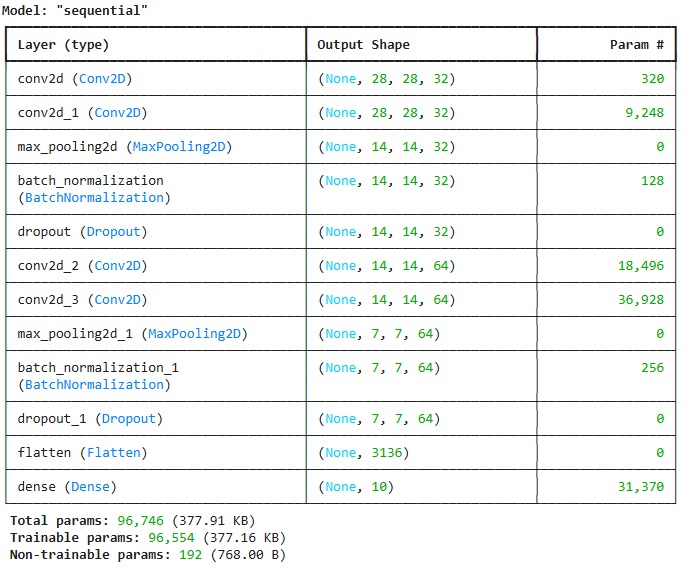
 ## Functional API
# 1. 세션 클리어
clear_session()

# 2. 레이어 사슬처럼 엮기
il = Input(shape=(28,28,1))
hl = Conv2D(filters=32,        # 새롭게 제작하려는 feature map의 수
            kernel_size=(3,3), # Conv2D Layer filter 사이즈 (depth는 케라스가 보정)
            strides=(1,1),     # Conv2D Layer filter 이동 보폭
            padding='same',    # 이전 feature map 사이즈 유지 | 외곽 정보 더 반영!
            activation='relu'  # 빼먹지 않기!
            )(il)
hl = Conv2D(filters=32,        # 새롭게 제작하려는 feature map의 수
            kernel_size=(3,3), # Conv2D Layer filter 사이즈 (depth는 케라스가 보정)
            strides=(1,1),     # Conv2D Layer filter 이동 보폭
            padding='same',    # 이전 feature map 사이즈 유지 | 외곽 정보 더 반영!
            activation='relu'  # 빼먹지 않기!
            )(hl)
hl = MaxPool2D(pool_size=(2,2), # Maxpooling Layer filter 사이즈
               strides=(2,2),   # Maxpooling Layer filter 이동 보폭
               )(hl)
hl = BatchNormalization()(hl)
hl = Dropout(0.25)(hl)

hl = Conv2D(filters=64,        # 새롭게 제작하려는 feature map의 수
            kernel_size=(3,3), # Conv2D Layer filter 사이즈 (depth는 케라스가 보정)
            strides=(1,1),     # Conv2D Layer filter 이동 보폭
            padding='same',    # 이전 feature map 사이즈 유지 | 외곽 정보 더 반영!
            activation='relu'  # 빼먹지 않기!
            )(hl)
hl = Conv2D(filters=64,        # 새롭게 제작하려는 feature map의 수
            kernel_size=(3,3), # Conv2D Layer filter 사이즈 (depth는 케라스가 보정)
            strides=(1,1),     # Conv2D Layer filter 이동 보폭
            padding='same',    # 이전 feature map 사이즈 유지 | 외곽 정보 더 반영!
            activation='relu'  # 빼먹지 않기!
            )(hl)
hl = MaxPool2D(pool_size=(2,2), # Maxpooling Layer filter 사이즈
               strides=(2,2),   # Maxpooling Layer filter 이동 보폭
               )(hl)
hl = BatchNormalization()(hl)
hl = Dropout(0.25)(hl)

hl = Flatten()(hl)
ol = Dense(10, activation='softmax')(hl)

# 3. 모델의 시작과 끝 지정
model = Model(il, ol)

# 4. 컴파일
model.compile(optimizer=keras.optimizers.Adam(), loss=keras.losses.categorical_crossentropy,
              metrics=['accuracy'])

model.summary()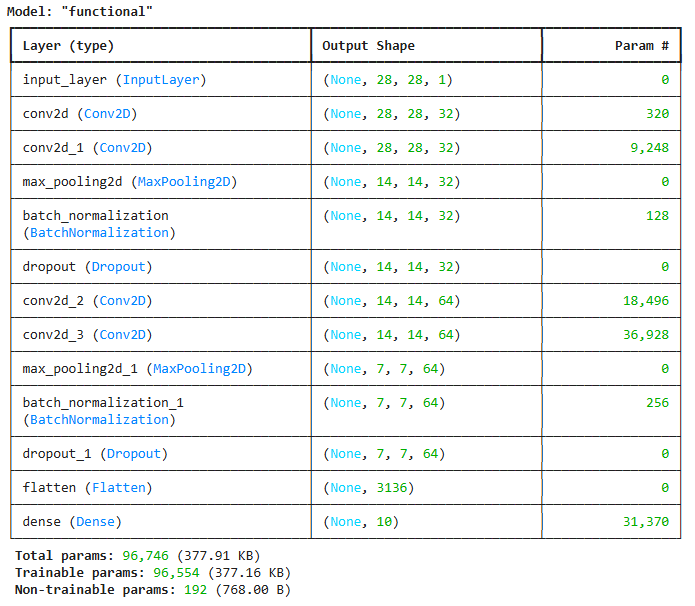
## Early Stopping
from keras.callbacks import EarlyStopping
es = EarlyStopping(monitor='val_loss', # 얼리스토핑을 적용할 관측 지표
min_delta=0, # 임계값. monitor에서 지정한 지표가 min_delta의 값보다 크게 변해야 성능 개선으로 간주
patience=3, # 성능 개선이 발생하지 않을 때, 얼마나 더 지켜볼 것인지.
verbose=1, # 얼리스토핑 적용 문구
restore_best_weights=True,# 최적의 가중치를 가진 epoch 시점으로 되돌림!
)hist = model.fit(train_x, train_y, validation_split=0.2,
verbose=1, epochs=1000,
callbacks=[es]
)Epoch 1/1000
1500/1500 ━━━━━━━━━━━━━━━━━━━━ 31s 7ms/step - accuracy: 0.9102 - loss: 0.2925 - val_accuracy: 0.9365 - val_loss: 0.2289
Epoch 2/1000
1500/1500 ━━━━━━━━━━━━━━━━━━━━ 24s 3ms/step - accuracy: 0.9807 - loss: 0.0669 - val_accuracy: 0.9852 - val_loss: 0.0595
Epoch 3/1000
1500/1500 ━━━━━━━━━━━━━━━━━━━━ 6s 4ms/step - accuracy: 0.9851 - loss: 0.0484 - val_accuracy: 0.9878 - val_loss: 0.0430
Epoch 4/1000
1500/1500 ━━━━━━━━━━━━━━━━━━━━ 5s 3ms/step - accuracy: 0.9884 - loss: 0.0404 - val_accuracy: 0.9875 - val_loss: 0.0432
Epoch 5/1000
1500/1500 ━━━━━━━━━━━━━━━━━━━━ 5s 3ms/step - accuracy: 0.9895 - loss: 0.0326 - val_accuracy: 0.9896 - val_loss: 0.0440
Epoch 6/1000
1500/1500 ━━━━━━━━━━━━━━━━━━━━ 6s 4ms/step - accuracy: 0.9914 - loss: 0.0283 - val_accuracy: 0.9907 - val_loss: 0.0448
Epoch 6: early stopping
Restoring model weights from the end of the best epoch: 3.performance_test = model.evaluate(test_x, test_y)
print(f'Test Loss : {performance_test[0]:.6f} | Test Accuracy : {performance_test[1]*100:.2f}%')313/313 ━━━━━━━━━━━━━━━━━━━━ 2s 5ms/step - accuracy: 0.9885 - loss: 0.0339
Test Loss : 0.029742 | Test Accuracy : 99.07%if not isinstance(hist, dict) :
history = hist.history
plt.figure(figsize=(10, 5))
plt.plot(history['accuracy'])
plt.plot(history['val_accuracy'])
plt.title('Accuracy : Training vs Validation')
plt.ylabel('Accuracy')
plt.xlabel('Epoch')
plt.legend(['Training', 'Validation'], loc=0)
plt.show()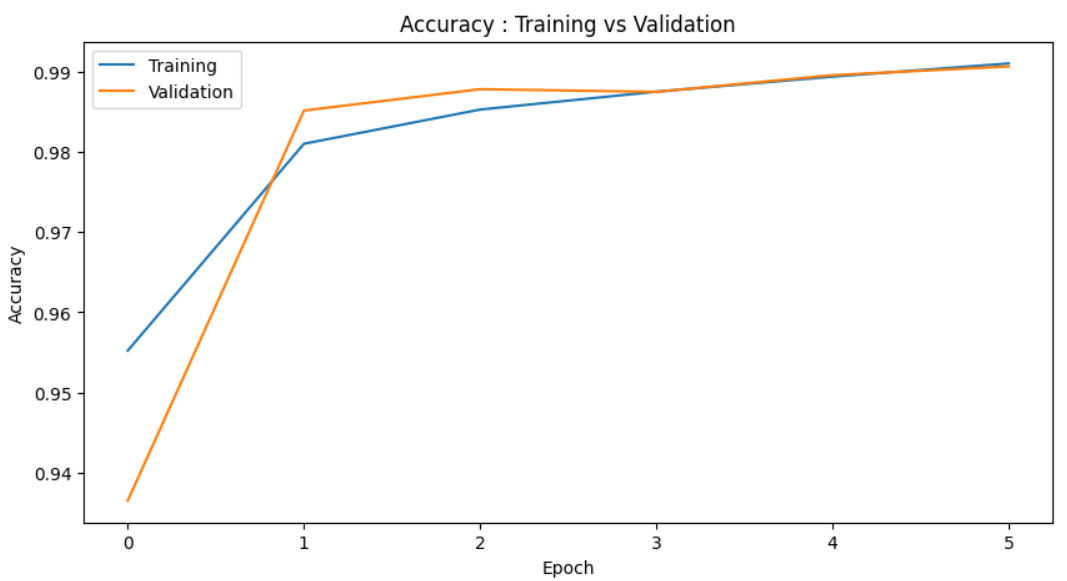
if not isinstance(hist, dict) :
    history = hist.history

plt.figure(figsize=(10, 5))
plt.plot(history['loss'])
plt.plot(history['val_loss'])
plt.title('Loss : Training vs Validation')
plt.ylabel('Loss')
plt.xlabel('Epoch')
plt.legend(['Training', 'Validation'], loc=0)
plt.show()
- 예측값 생성
pred_train = model.predict(train_x)
pred_test = model.predict(test_x)

single_pred_train = pred_train.argmax(axis=1)
single_pred_test = pred_test.argmax(axis=1)

train_y_arg = train_y.argmax(axis=1)
test_y_arg = test_y.argmax(axis=1)

logi_train_accuracy = accuracy_score(train_y_arg, single_pred_train)
logi_test_accuracy = accuracy_score(test_y_arg, single_pred_test)

print('CNN')
print(f'트레이닝 정확도 : {logi_train_accuracy*100:.2f}%' )
print(f'테스트 정확도 : {logi_test_accuracy*100:.2f}%' )
1875/1875 ━━━━━━━━━━━━━━━━━━━━ 4s 2ms/step
313/313 ━━━━━━━━━━━━━━━━━━━━ 1s 3ms/step
CNN
트레이닝 정확도 : 99.22%
테스트 정확도 : 99.07%숫자 이미지 시각화
'''
성능 확인을 위해
Ctrl+Enter를 이용하여
반복 실행 해보자!
'''

id = rd.randrange(0,10000)

print(f'id = {id}')
print(f'다음 그림은 숫자 {test_y_arg[id]} 입니다.')
print(f'모델의 예측 : {single_pred_test[id]}')
print(f'모델의 카테고리별 확률 : {np.floor(pred_test[id]*100)}')

if test_y_arg[id] == single_pred_test[id] :
    print('정답입니다')
else :
    print('틀렸어요')

plt.imshow(test_x[id].reshape([28,-1]), cmap='gray')
plt.show()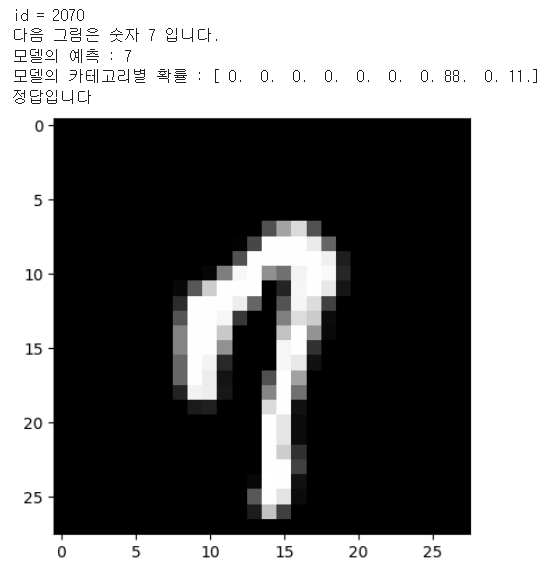
'''
틀린 것만 관찰해보자!

Ctrl+Enter를 이용하여
반복 실행 해보자!
'''

true_false = (test_y_arg==single_pred_test)
f_id = np.where(true_false==False)[0]
f_n = len(f_id)

id = f_id[rd.randrange(0,f_n)]

print(f'id = {id}')
print(f'다음 그림은 숫자 {test_y_arg[id]} 입니다.')
print(f'모델의 예측 : {single_pred_test[id]}')
print(f'모델의 카테고리별 확률 : {np.floor(pred_test[id]*100)}')

if test_y_arg[id] == single_pred_test[id] :
    print('정답입니다')
else :
    print('틀렸어요')

plt.imshow(test_x[id].reshape([28,-1]), cmap='gray')
plt.show()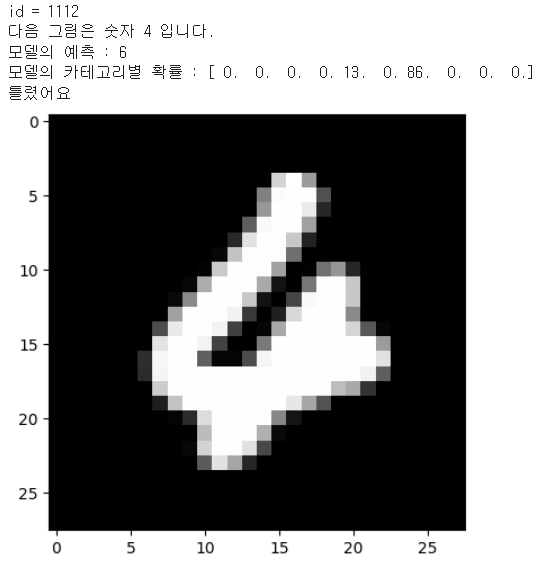
'AI_딥 러닝_시각지능' 카테고리의 다른 글
| AI_파이썬_시각지능_CNN_Image_SmallData2024 (0) | 2024.12.30 |
|---|---|
| AI_파이썬_시각지능_CNN_exercise_notMNIST_small_2024 (0) | 2024.12.30 |
| AI_파이썬_시각지능_CNN_exercise_CIFAR10_2024 (1) | 2024.12.30 |
| AI_파이썬_시각지능_CNN_exercise_Fashion_MNIST_2024 (0) | 2024.12.30 |
| AI_파이썬_시각지능_notMNIST_small_2024 (0) | 2024.12.30 |


